
The TDS Audit Report in Sage 300 plays a crucial role in validating Tax Deducted at Source (TDS) transactions, especially in scenarios where remittance or adjustment entries are pending or incomplete. This report helps finance and compliance teams ensure accuracy, identify gaps, and maintain statutory compliance.
In a previous post, we explained the TDS Audit Report, which is work for invoice transaction. Now we have done enhancement in which now this screen works for invoice as well as payment transactions too.
Let’s walk through the functionality of the TDS Audit Report screen.
New Stuff:- AP Invoice Import – Improved Handling for Repeated Vendor and DocID Entries.
The TDS Audit Report is designed to monitor the status of TDS-related transactions and highlight gaps in processing, specifically focusing on:
- Missing adjustment entries
- Missing remittance entries
To print this report Go to, Tax deducted at Source Module–> D/T Transaction Report–> TDS Not Deducted Report. The UI is as shown below and has the below mentioned criteria.
The utility includes the following criteria:
1) Document Type:- The utility provides a drop-down list for selecting the transaction type. Users can choose from.
- Invoice
- Payment
2) Posting Date:- Users can specify a From Date and To Date. Only transactions posted within the selected date range will be included in the report.
3) Select Report:- This section allows users to filter trafnsactions based on their TDS processing status.
- Remitted but Adjustment not created
- Both not created
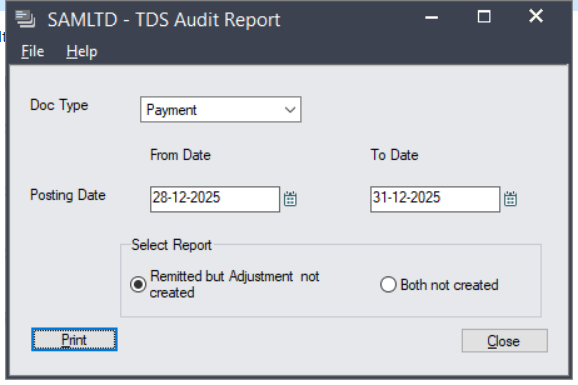
After selecting the above criteria, clicking on Print will generate the report based on the selected parameters.
Below is th screenshot of the out put of the report.
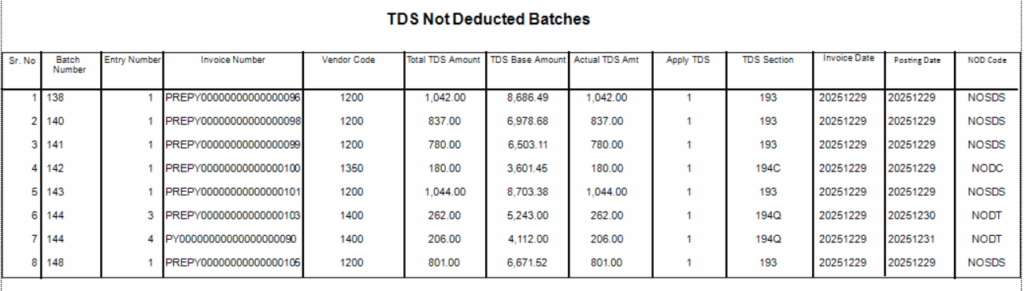
As shown in the above output, the report is generated successfully. It includes details such as batch number, entry number, invoice number, vendor number, and TDS-related information including TDS amount, TDS section, NOD, TDS posting status, and other relevant details.
Using this report, users can easily identify which invoice and payment transactions need to be processed through the Manual TDS Posting Utility in the TDS module, ensuring that all statutory statutory steps related to TDS are properly completed.
About Us:-
Greytrix – a globally recognized and one of the oldest Sage Gold Development Partner is a one-stop solution provider for Sage ERP and Sage CRM organizational needs. Being acknowledged and rewarded for multi-man years of experience, we bring complete end-to-end assistance for your technical consultations, product customization, data migration, system integration’s, third party add-on development and implementation competence.
Greytrix offers unique GUMU™ integrated solutions of Sage 300 with Sage CRM, Salesforce.com, Dynamics 365 CRM and MagentoeCommerce along with Sage 300 Migration from Sage 50 US, Sage 50 CA, Sage PRO, QuickBooks, Sage Business Vision and Sage Business Works. We also offer best-in-class Sage 300 customization and development services and integration services for applications such as POS | WMS | Payroll | Shipping System | Business Intelligence | eCommerce for Sage 300 ERP and for Sage 300c development services we offer, upgrades of older codes and screens to new web screens, latest integration’s using Data and web services to Sage business partners, end users and Sage PSG worldwide. Greytrix offers 20+ addons for Sage 300 to enhance productivity such as GreyMatrix, Document Attachment, Document Numbering, Auto-Bank Reconciliation, Purchase Approval System, Three way PO matching, Bill of Lading and VAT for Middle East. The GUMU™ integration for Dynamics 365 CRM – Sage ERP is listed on Microsoft Appsource with easy implementation package.
For more details on Sage 300 and Sage 300c Services, please contact us at accpac@greytrix.com, We will like to hear from you.