
Accurate shipping information is essential for smooth order fulfillment. In Sage 300 Order Entry (OE), Ship Via Codes determine how products are shipped to customers. The OE Ship Via Code Screen Report provides a reliable way to manage, review, and validate all configured shipping methods.
This blog walks through the report screen and its output.
New stuff:- Enhancing Return Processing with New GR Module Features in Sage 300
The OE Ship Via Code Screen Report allows users to generate a list of Ship Via codes defined in the system. The report is driven by a selection screen where users can specify a range of Ship Via codes to be printed, making it easy to review specific records or the entire setup.
The primary purpose of this report is to give users a consolidated view of all Ship Via codes configured in the system. It acts as a reference and audit tool, ensuring shipping configurations are accurate and up to date.
This report is commonly used by functional consultants, system administrators, and operations teams to ensure shipping methods are correctly configured and maintained.
Please refer below UI of AR GL Transactions report.
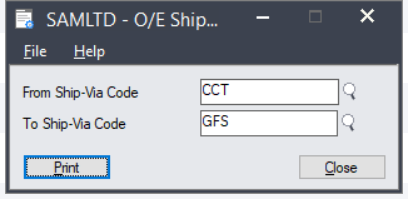
The report screen contains the following fields:
- From Ship-Via Code
- To Ship-Via Code
Once printed, the OE Ship Via Code Report displays detailed information for each Ship Via code in a structured, easy-to-read format.
Please refer below output of Ship-Via Code report. :-
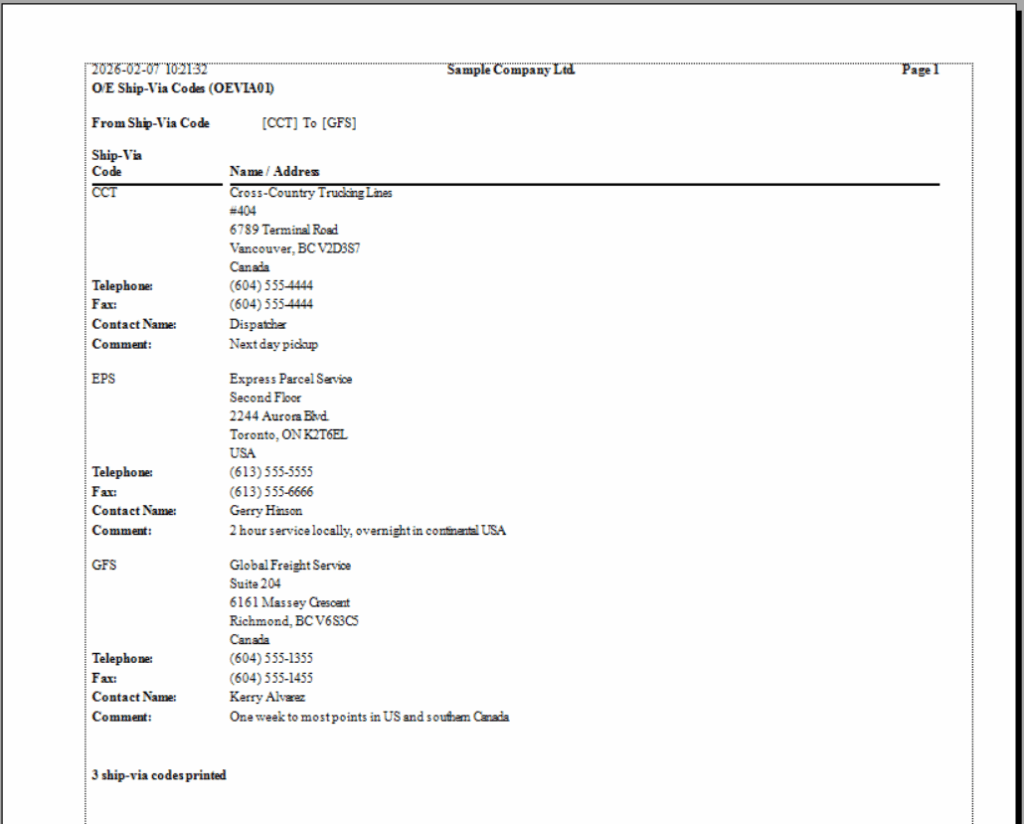
For each Ship Via code, the report displays:
- Ship Via Code
- Name and Address of the carrier or delivery service
- Telephone and Fax numbers
- Contact Name
- Comments or special shipping notes (e.g., delivery timelines or service coverage)
The structured report provides a clear and complete view, making it easy for users to quickly identify and review individual shipping methods. From a simple selection screen to detailed carrier information for all shipping methods used in Order Entry transactions, the well-organized output enhances both usability and readability.
Overall, the report helps organizations maintain accuracy, consistency, and better control over their Order Entry processes.
About Us:-
Greytrix – a globally recognized and one of the oldest Sage Gold Development Partner is a one-stop solution provider for Sage ERP and Sage CRM organizational needs. Being acknowledged and rewarded for multi-man years of experience, we bring complete end-to-end assistance for your technical consultations, product customization, data migration, system integration’s, third party add-on development and implementation competence.
Greytrix offers unique GUMU™ integrated solutions of Sage 300 with Sage CRM, Salesforce.com, Dynamics 365 CRM and MagentoeCommerce along with Sage 300 Migration from Sage 50 US, Sage 50 CA, Sage PRO, QuickBooks, Sage Business Vision and Sage Business Works. We also offer best-in-class Sage 300 customization and development services and integration services for applications such as POS | WMS | Payroll | Shipping System | Business Intelligence | eCommerce for Sage 300 ERP and for Sage 300c development services we offer, upgrades of older codes and screens to new web screens, latest integration’s using Data and web services to Sage business partners, end users and Sage PSG worldwide. Greytrix offers 20+ addons for Sage 300 to enhance productivity such as GreyMatrix, Document Attachment, Document Numbering, Auto-Bank Reconciliation, Purchase Approval System, Three way PO matching, Bill of Lading and VAT for Middle East. The GUMU™ integration for Dynamics 365 CRM – Sage ERP is listed on Microsoft Appsource with easy implementation package.
For more details on Sage 300 and Sage 300c Services, please contact us at accpac@greytrix.com, We will like to hear from you.