
Sage X3’s Project Management module (commonly referred to as PJM) is designed to support a wide range of project types, including services, manufacturing, and custom billing contracts. It provides a flexible framework for defining project structures and for tracking costs, operations, and project progress within an integrated ERP environment.
Sage X3 also provides the ability to change project status, as shown in the screenshot below.
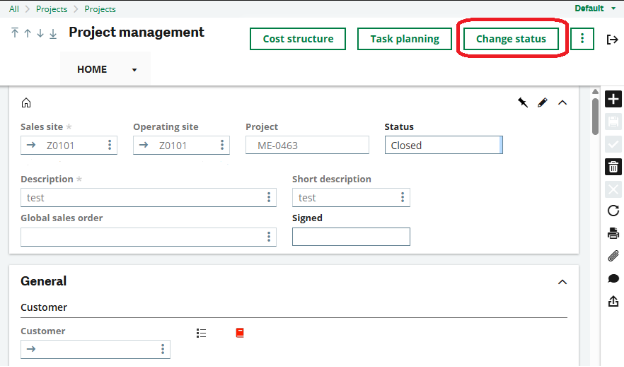
The status change feature is a key component of project management in Sage X3. It enables users to update the lifecycle stage of project elements to accurately reflect project progress—for example, transitioning from planning to execution or from execution to closure.
This functionality ensures precise tracking of project activities, prevents unauthorized actions on completed elements, and seamlessly integrates with related processes such as Material Requirements Planning (MRP) and time entry management. Project statuses follow predefined workflows (for example, New → Planned → Launched → Started → Delivered → Closed), with system controls in place to enforce valid transitions. For instance, a task cannot be closed unless it has first been delivered.
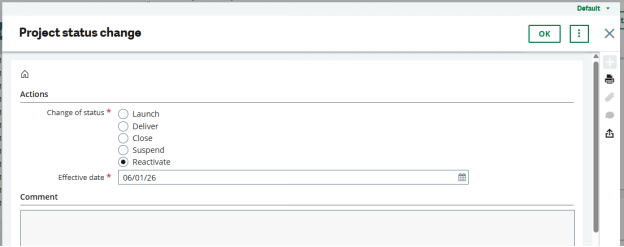
One of our clients had a requirement that the project reactivation option should be available only to specific users. Additionally, they wanted the reactivation action to be moved from the Change Status radio button to a direct header-level button, allowing projects to be reactivated with a single click.
To meet this requirement, we removed the Reactivate option from the Change Status radio button and added a Reactivate Project button to the header screen, as shown in the screenshot below.
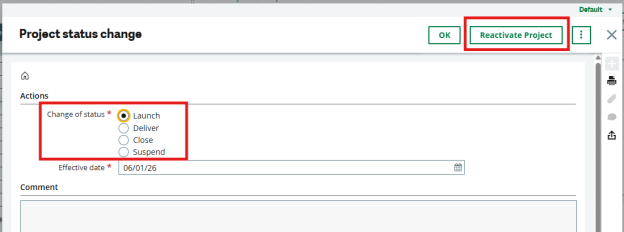
Structural changes alone are not sufficient for the project reactivation functionality to work. To enable reactivation through the new button, we analyzed the Sage X3 standard project scripts and implemented custom logic to support the Reactivate Project button.
As part of the customization, we introduced a new miscellaneous table in which the client can define the list of users authorized to reactivate projects. This table is referenced within the custom script to validate user authorization and restrict unauthorized users from reactivating projects.
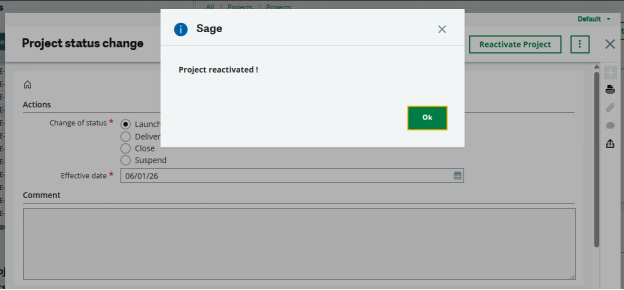
When an authorized user clicks the Reactivate Project button, the project is reopened and an informative message is displayed, as shown below.
If an unauthorized user attempts to reactivate a project, the system restricts the action and prevents the project from being reopened. In such cases, an informative message is displayed to notify the user that they are not authorized to perform this action, as shown below.
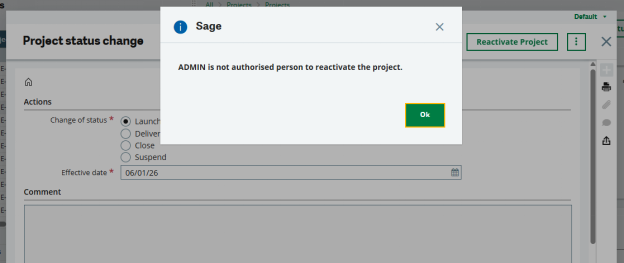
This approach demonstrates how we implemented a user-wise project reactivation feature within the Sage X3 Project Management module, ensuring controlled access and adherence to the client’s authorization requirements.
About Us
Greytrix – a globally recognized and one of the oldest Sage Development Partners is a one-stop solution provider for Sage ERP and Sage CRM organizational needs. Being acknowledged and rewarded for multi-man years of experience and expertise, we bring complete end-to-end assistance for your technical consultations, product customizations, data migration, system integrations, third-party add-on development, and implementation competence.
Greytrix has some unique integration solutions developed for Sage CRM with Sage ERPs namely Sage X3, Sage Intacct, Sage 100, Sage 500, and Sage 300. We also offer best-in-class Sage ERP and Sage CRM customization and development services to Business Partners, End Users, and Sage PSG worldwide. Greytrix helps in the migration of Sage CRM from Salesforce | ACT! | SalesLogix | Goldmine | Sugar CRM | Maximizer. Our Sage CRM Product Suite includes addons like Greytrix Business Manager, Sage CRM Project Manager, Sage CRM Resource Planner, Sage CRM Contract Manager, Sage CRM Event Manager, Sage CRM Budget Planner, Gmail Integration, Sage CRM Mobile Service Signature, Sage CRM CTI Framework.
Greytrix is a recognized Sage Champion Partner for GUMU™ Sage X3 – Sage CRM integration listed on Sage Marketplace and Sage CRM – Sage Intacct integration listed on Sage Intacct Marketplace. The GUMU™ Cloud framework by Greytrix forms the backbone of cloud integrations that are managed in real-time for the processing and execution of application programs at the click of a button.
For more information on our integration solutions, please contact us at sage@greytrix.com. We will be glad to assist you.