
In real-time business reports—especially in Sage X3 Crystal Reports, it is very common to encounter repeated values across multiple detail lines. Examples include packing lists, invoices, delivery notes, or purchase registers where the same Pack Number, Gross Weight, or Dimension details repeat for multiple item lines.
Printing the same values again and again not only reduces readability but also makes the report look cluttered and unprofessional. In many customer requirements, the expectation is:
- The value should print only once (on the first occurrence)
- The remaining lines should still be displayed
- Sometimes the line layout must be adjusted (half-line / spacing control) for better alignment
Recently, we received a requirement from one of our clients for the Packing List PDF report. If the same Pack No appears on the second or subsequent lines, the Pack details should be printed only once (on the first line), and the repeated values should be suppressed on the following lines.
However, the line display requirement is opposite: the line should be printed only at the end of the same Pack No sequence. For the remaining lines within the same packing detail, the line should not be printed.
Please find the below screenshot for the exact requirement.
New Stuff: How to Manage Variable-Weight Products in Sage X3
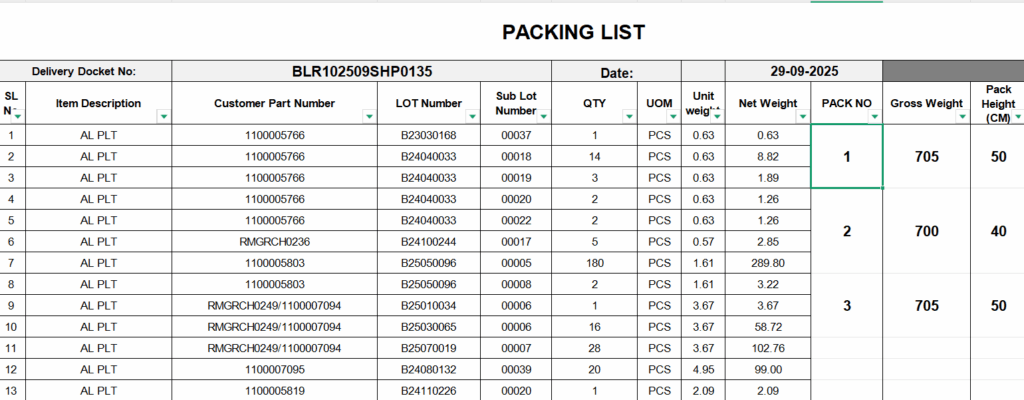
In this blog, we will see how to manage repeated data and suppress values effectively using the Previous() and Next() functions in Crystal Reports, based on a real-world packing list scenario.
Understanding Previous and Next Functions –
- Previous Function – The Previous() function fetches the value from the previous record.
Syntax: Previous({Table.Field})
Used to:
- Compare current and previous record values
- Detect duplicates
- Suppress repeated values
- Next Function – The Next() function fetches the value from the next record.
Syntax: Next({Table.Field})
Used to:
- Check if the value will repeat on the next line
- Control spacing, borders, or line formatting
- Manage partial line display scenarios
To implement the above requirement, please follow the steps outlined below:
Step 01 – Suppress Repeated Values Using the Previous Function
Open the report in Crystal Reports and place the field in the Detail section that you do not want to repeat on the second or subsequent lines.
Next, right-click on the field, select Format Field, and open the Common tab. In this tab, you will find the Suppress option, where you can add a custom condition to suppress the field based on your requirement.
In this scenario, we have selected the Pack No field because we do not want the same Pack No to repeat on multiple lines. Add the following condition using the Previous() function, as shown in the screenshot below:
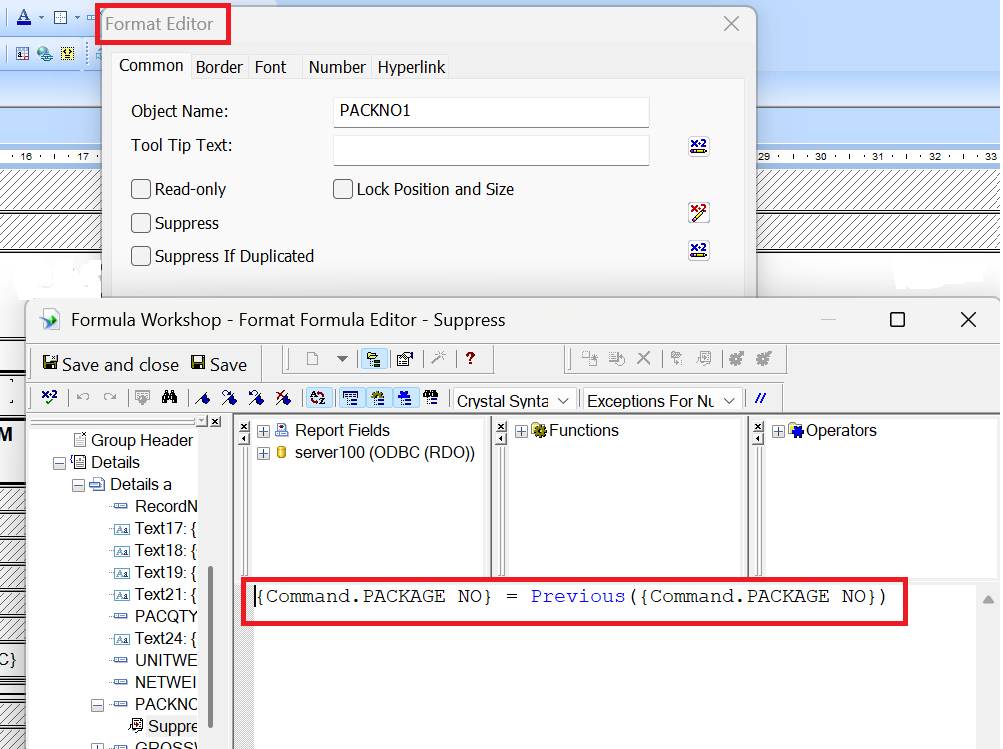
This formula checks whether the current Pack No is the same as the previous record. If it is, the value will be suppressed, ensuring that the Pack No is printed only once for the same sequence.
Step 02 – Suppression of Line Using the Next Function
In Crystal Reports, there is no direct option to suppress a line object from the Format Editor. As shown in the screenshot below, the line object does not support conditional suppression.
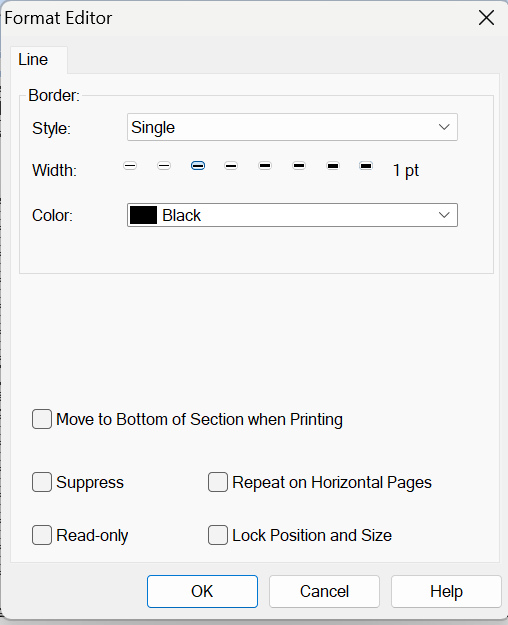
Based on the client requirement, the line should be printed only at the end of the same Pack No sequence. For all intermediate records with the same value, the line should not be displayed.
To achieve this, we used a workaround approach:
- Insert a blank Text Object and place it below the detail section where the line is required.
- Right-click on the text object and select Format Text.
- In the Border tab, enable only the Bottom border. This bottom border will act as a horizontal line.
- Now, apply a Suppress condition on the text object.
- Add the following formula using the Next function:
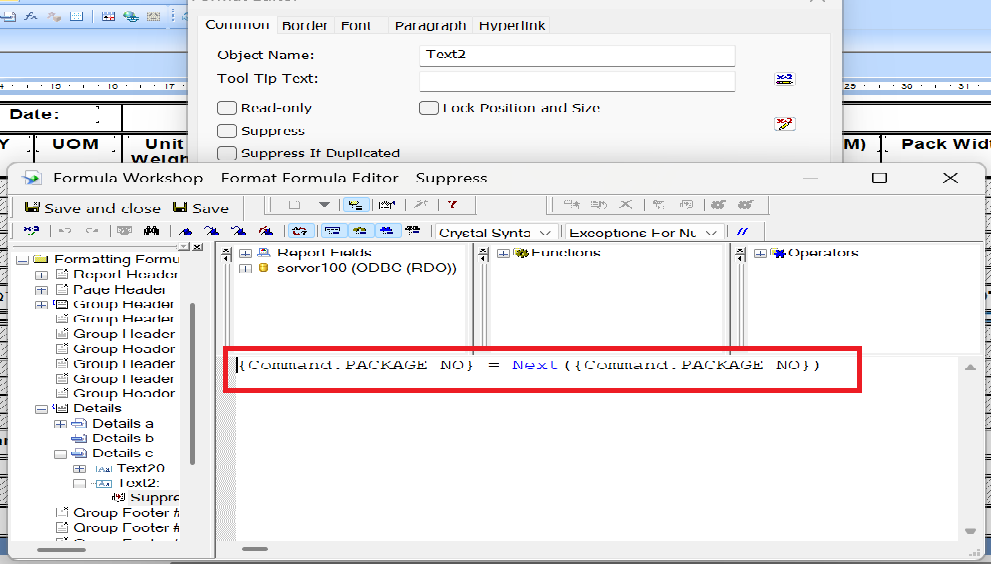
This condition checks whether the next record has the same Pack No.
- If the value is the same, the text object (line) is suppressed.
- If the value is different, the line is printed, indicating the end of that Pack No sequence.
Step 05 – In below screenshot you will get desired output.
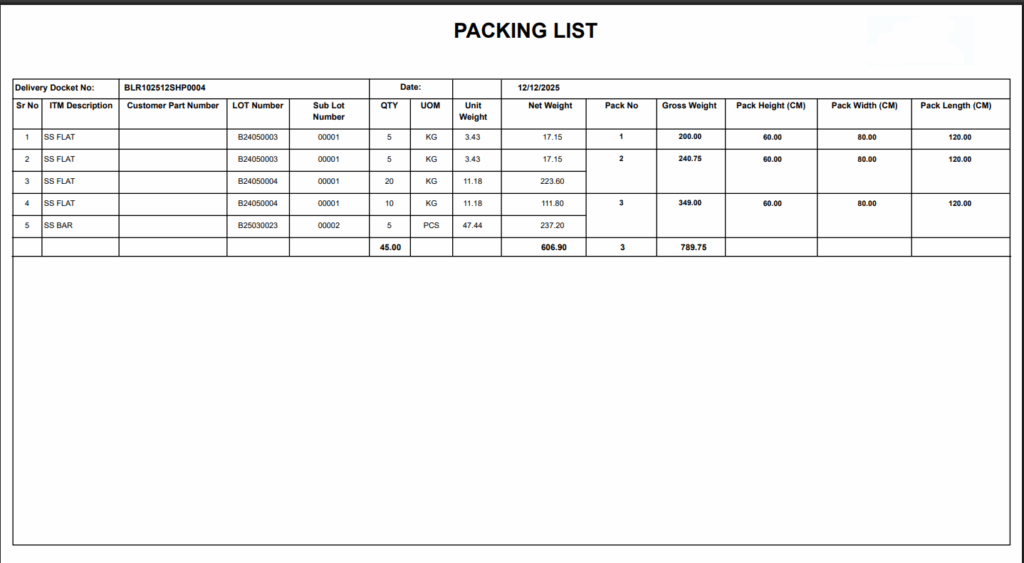
By using the above simple steps, we can manage repeated data and line suppression using Next() & Previous() function in crystal reports.