
Finance teams often process a large number of sales invoices every day. Activities such as posting invoices, printing invoice documents, and sending them to customers can become repetitive when each invoice is handled separately. As transaction volumes increase, businesses require efficient ways to manage these processes while ensuring accuracy and timely document distribution.
To improve this process, a solution was designed in Sage X3 to simplify sales invoice handling and reduce manual effort involved in day-to-day invoice processing.
Solution
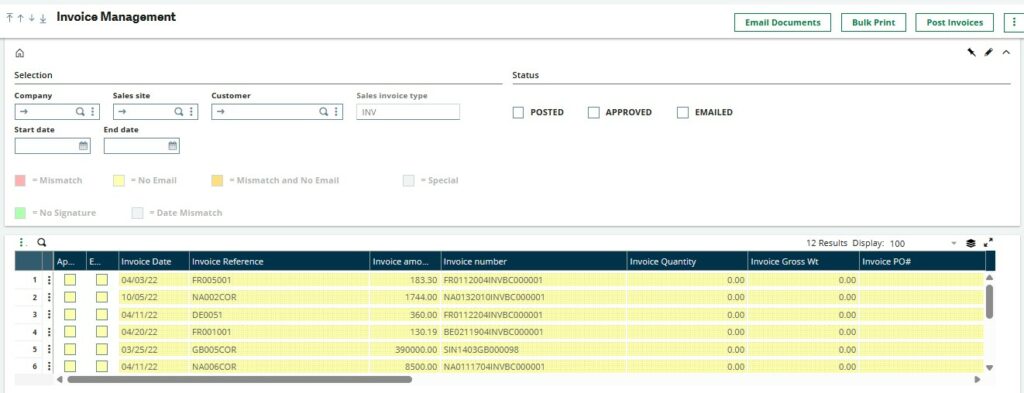
A custom Sales Invoice Inquiry was developed in Sage X3 to provide users with a centralized view of all unposted sales invoices. From this inquiry, users can select multiple invoices and perform required actions without opening each invoice individually.
Bulk Emailing of Invoice Documents
The inquiry includes an Email Documents option for sending invoice document to customers.
The document format depends on the preference configured for each customer.
- If the customer is configured to receive individual PDFs, each invoice is attached as a separate document.
- If the customer is configured to receive a combined PDF, the system groups all selected invoices for that customer and generates a single PDF containing those invoices.
When invoices for multiple customers are selected, the system automatically creates a separate combined PDF for each customer, ensuring that every customer receives only their own invoice documents.
Bulk Printing
The same approach has been applied to document printing.
Users can print multiple invoice document in a single operation. When the combined print option is applicable, invoices belonging to the same customer are merged into one document instead of generating separate document for each invoice. This makes printing large batches of invoices more organized and easier to manage.
Bulk Invoice Posting
Instead of posting invoices individually, users can select multiple records and post them in a single operation. This reduces the number of manual steps involved in the posting process and allows finance teams to complete routine tasks more efficiently.
Business Scenario
Consider a user who needs to process twenty unposted sales invoices belonging to five different customers.
Using the custom inquiry screen, the user selects all invoices and posts them in a single action. If invoice documents need to be emailed, the system checks each customer’s document preference. Customers configured for combined PDFs receive one consolidated invoice document, while customers configured for individual PDFs receive separate invoice attachments. The same grouping logic is applied when printing invoice documents.
This allows users to complete multiple business activities from one screen without repeatedly opening individual invoices.
The custom Sales Invoice Inquiry extends the standard invoice processing capabilities of Sage X3 by bringing together posting, printing, and email distribution into a single workflow. By supporting bulk operations and customer-specific document preferences, the solution simplifies day-to-day invoice processing while providing a more efficient way to manage business documents.