
Resolving the “Product unauthorized for this user.” Error in Enterprise Planning
Issue
While working in Enterprise Planning, users may encounter the following error:
Product unauthorized for this user.
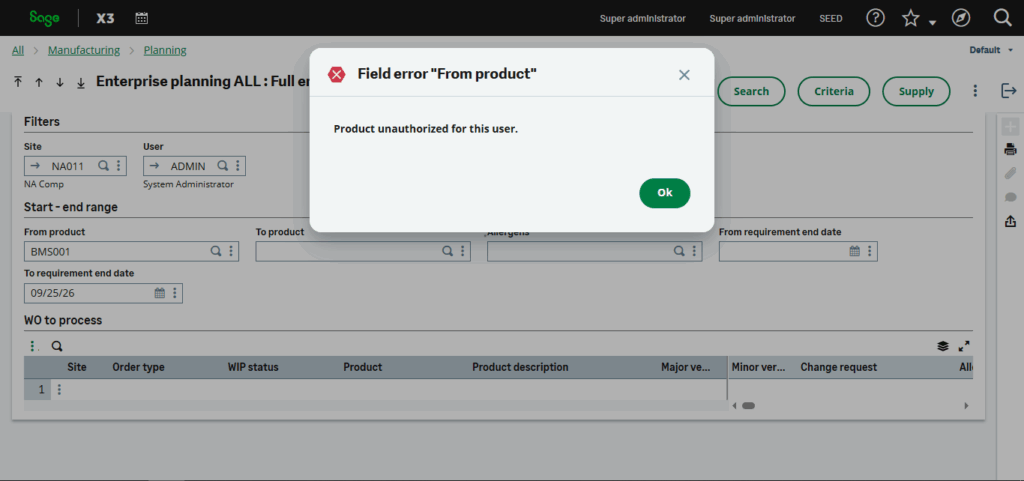
This error occurs when the logged-in Enterprise Planning user is not assigned as either the Buyer or the Planner for the selected product-site record in Sage X3.
Cause
Each product-site record can have a designated Planner and Buyer responsible for planning and procurement activities.
Enterprise Planning validates the current user against these assignments:
- If the current user is the Planner, they can perform planning-related actions such as creating or modifying planning requests.
- If the current user is the Buyer, they can perform procurement-related actions, such as creating purchase orders directly.
- If the current user is neither the Planner nor the Buyer, Enterprise Planning blocks access to the product and displays the message:
Product unauthorized for this user.
This restriction ensures that only users assigned responsibility for the product can perform planning or purchasing operations.
Resolution
To resolve the issue:
- Open the Product-Site record in Sage X3.
- Review the Planner and Buyer fields.
- Ensure that the logged-in Enterprise Planning user is assigned as either:
- the Planner, or
- the Buyer.
- Save the changes and, if required by your environment, synchronize the updated master data with Enterprise Planning.
Once the user is assigned as either the Planner or Buyer, the product becomes accessible according to their role and the error no longer appears.
The “Product unauthorized for this user.” message in Enterprise Planning is a standard authorization check that helps ensure planning and procurement activities are performed only by users assigned responsibility for a product. By verifying that the logged-in user is designated as either the Planner or the Buyer in the Product-Site record, organizations can quickly resolve the issue and maintain proper role-based access. Regularly reviewing these assignments, especially when responsibilities change, can help prevent this error and ensure a smooth planning process.