
A distributor’s online store accepted an order for 50 units at 9:14 am, and Sage X3 reflected it by 9:15. But the warehouse could pick only 35: The storefront displayed 50 units based on physical on-hand stock, without deducting the 15 units already allocated to a wholesale order. The actual available-to-promise quantity was only 35.
By noon, sales, finance, and customer service were swapping spreadsheets to find the gap.
This illustrates an integration gap: the systems are connected, but operations and workflows aren’t.
Omnichannel inventory management requires more than synchronizing on-hand quantities. D2C storefronts and wholesale portals may follow different allocation rules. A business must account for reserved stock, customer-specific allocations, quality holds, backorders and channel-level availability before publishing a sellable quantity.
Most Sage X3 companies connect CRM, warehouse systems, and online stores, yet still manually reconcile numbers. Sage X3 integration challenges don’t come from poor integration, but from the gap between transferring data and executing processes.
A recent connectivity benchmark survey of 1,050 IT leaders found organizations run an average of 957 applications but connect only 27%. Also, 71% said their infrastructure makes systems overly dependent on one another.
This article distinguishes system from process integration, identifies five damaging blind spots and their causes, and explains what executives should expect from a Sage X3 integration program.
System Integration vs Business Process Integration: What’s the difference?
System integration connects applications, so data can move between them. For eg. A customer record travels from CRM to Sage X3. An order travels from Shopify to X3. Or a tracking number comes back from the carrier.
Business process integration connects the complete workflow. It makes sure the right action happens, in the right sequence, by the right owner. An order is not “done” when it reaches Sage X3 ERP. It gets done when it is promised, picked, shipped, invoiced and paid, with every exception handled along the way.
| Dimension | System integration | Business process integration |
| Unit of work | An interface, API call or file transfer | An end-to-end process such as order-to-cash |
| Question it answers | “Did Sage X3 receive the order?” | “Can we promise, ship, invoice and collect without manual work?” |
| How success is measured | Data arrived; the job completed | Cycle time, on-time delivery, first-time-right orders, days sales outstanding |
| Typical failure | A field is missing or a message fails | An exception has no owner, rule or recovery path |
| Usual owner | IT or the integration vendor | A process owner, with operations, finance, sales and IT |
Most projects for integrating ERP with business systems are scoped in the left-hand column: “connect Salesforce to Sage X3” or “send orders to the WMS.” Most executive frustration lives in the right-hand column.
That mismatch is where the blind spots appear.
Integration Blind Spots Businesses Often Overlook
- Sync timing that does not match business decisions
Data moves on a schedule that suits the integration, not the decision that depends on it.
Example: Finance updates a price list in Sage X3 in the morning. The storefront receives the change only in the nightly batch. Until then, customers keep ordering at the old price, and finance has to issue credit notes or absorb the difference.
Business cost: Margin leakage, credit notes, customer disputes and manual corrections.
Question for leadership: For each data flow, how current must the data be for the decision it supports?
- Inconsistent data across systems
Connected applications hold different or outdated versions of the same customer, product or price.
Example: A sales rep updates a customer’s delivery address in the CRM. Sage X3 still holds the old address because nobody decided which system is the master for addresses. The shipment goes to the wrong site, and the freight is paid twice.
Inventory is the costliest issue. Many storefronts read raw on-hand quantities from Sage X3 and miss stock that is already allocated, reserved or held for quality checks. Shoppers can then buy units that sit on the shelf but cannot actually be sold. Business cost: Overselling, wrong shipments, billing disputes and reports that executives stop trusting.
Question for leadership: For every shared data field, which system is the system of record?
- Disconnected departmental workflows
Each department gets data from its own system, but not the information it needs from the others.
Example: The warehouse updates the dispatch status in its WMS, but that information does not sync with Sage X3 or the CRM. Sales continues to see an outdated order status and gives the customer an incorrect delivery update.
Business cost: Conflicting customer promises, internal escalations and a customer experience that feels like dealing with three companies instead of one.
Question for leadership: Who owns the customer promise from order to delivery, across departments?
- Inadequate exception handling
A transaction fails or only partly succeeds, and no process detects or resolves it.
Example: An online order is created in Sage X3 after payment authorization, but the subsequent payment capture fails. If the integration does not update the order’s payment status or trigger a fulfillment hold, the warehouse may release an order that has not been successfully paidIn another case, the connection times out after Sage X3 has already created the order. The connector resends it without checking, and X3 now holds a duplicate sales order.
Business cost: Unpaid shipments, duplicate orders, refunds, manual reconciliation and staff time spent firefighting.
Question for leadership: When a transaction fails or partly succeeds, what happens next, and how long until someone knows?
- Limited integration monitoring
The business can see whether an interface ran. It cannot see whether the process finished.
Example: An order reaches Sage X3, but the shipment update back to the storefront fails without an alert. The dashboard says the nightly job “completed.” The customer finds out first.
Business cost: Problems surface through customer complaints or month-end reconciliation, when they are most expensive to fix.
| Blind spot | What it looks like | Where the cost shows up |
| Sync timng that does not match decisions | Decsions run on outdated data | Margin leakage, credit notes, rework |
| Inconsistent data | Different values in different systems | Fulfillment errors, billing disputes, reporting trust |
| Disconnected departmental workflows | Teams work from different versions of the truth | Customer promises, internal escalation |
| Inadequate exception handling | Failed or partial transactions stall silently | Duplicates, refunds, manual rework |
| Limited monitoring | Interfaces look healthy; processes don’t finish | Late detection, customer-visible failures |
Why Do These Integration Gaps Occur?
Most ERP integration inssues come from how projects are planned, owned and measured, not from weak technology.
- Scoped by system pair – “CRM to ERP” gets a project plan. “Quote to cash” often does not, so field mappings come before decisions and exception paths.
- No formal data ownership – In ERP integration with multiple platforms, data flows both ways with no rule on which system wins.
- Testing limited to standard transactions – Cancellations, partial shipments, credit holds, and duplicate messages go untested.
- Technical-only monitoring – Logs show that a call succeeded, not that an order shipped and was invoiced.
As per the survey, IT teams spend an average of 36% of their time building custom integrations, and 26% of IT projects ran late in the past year.
How to Build More Connected Business Operations with Sage X3
- Start with the outcome – Define the result, such as every order shipped, invoiced and paid without re-entry. Then map systems and owners to it.
- Assign a system of record – Decide which system owns each data domain, for example Sage X3 for customer and product master data and the WMS for stock movements.
- Match sync speed to the decision – Order acceptance, stock and payment status need near-real-time updates. Bulk catalog changes and reconciliation can run on a schedule.
- Design for failure – Build in traceable references, duplicate protection and an exception queue with a named owner.
- Monitor process completion – Alert on stuck orders and shipments without invoices, not just on failed API calls.
Before moving forward, run the test. Take a real single order, add a stock shortfall or payment failure, and trace it. If resolving it needs a spreadsheet or a phone call, you have found a blind spot. Effective monitoring should track an order using a shared transaction reference across Shopify, Sage X3 and the WMS. This makes it possible to identify where an order stalled, whether quantities changed, and whether the next process step was completed.
Why the Right Sage X3 Integration Partner Matters
A connector solves data movement. A partner should help solve the operation around it. That takes Sage X3 depth, process design skills and a support model that lasts beyond go-live.
We have published a detailed Integration Guide, especially for Sage X3 ERP.
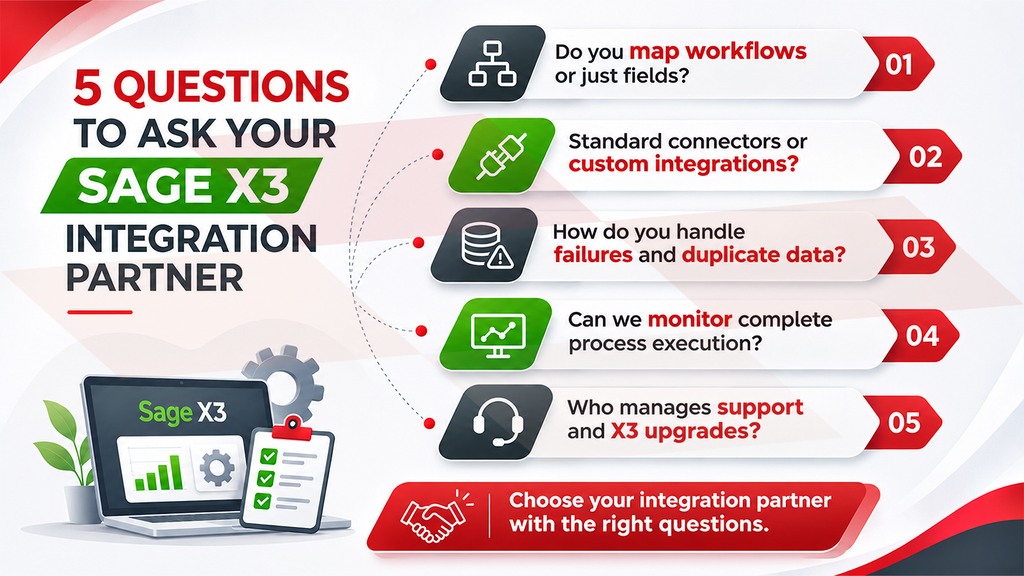
Greytrix delivers ERP integration solutions for SageX3 through this combination of products and services. Its in-house connector platform, GUMU™, is a cloud-based SaaS connector that does not require an on-premises server.
For Sage X3, Greytrix offers GUMU™ integrations with Salesforce, Sage CRM, Microsoft Dynamics 365 CRM, Shopify and Magento. The platform supports bi-directional sync, on-demand or scheduled data transfer, and entity and field mapping.
When standard connectors don’t fit a company’s rules, Greytrix’s Sage X3 implementation, customization, and support teams can build the custom workflows, validations, and integrations the process needs. The right partner helps you define them, then builds the integration around them.
Conclusion
The number of integrations you run is not the measure of success. The measure is whether an order, a purchase or a return can move through the business without manual rescue.
Sage X3 can be it at the center of that operation. But it needs more than APIs. It needs a clear system of record for every data domain, workflows designed around outcomes, defined responses to failure, and monitoring that watches the process, not just the pipe.
Take a small step first. Run the one-order test on your highest-value process this quarter. The blind spots it exposes will tell you where to invest next.
If you want an experienced view of your current Sage X3 integrations, Greytrix’s Sage X3 integration team can help you assess where data moves but operations stall, and what it would take to close the gap.
Frequently Asked Questions
1. What is the difference between Sage X3 integration and business process integration?
Sage X3 integration connects X3 to other applications so data can move between them. Business process integration makes sure that data triggers the right actions, in the right order, by the right owner, until an outcome such as order-to-cash is complete.
2. What integration options does Sage X3 support?
For Sage X3 third-party integration, Sage documents SOAP web services, a GraphQL API and a REST-based Data Integration API for file-based exchange. Sage X3 also supports import/export templates and workflow rules. The right choice depends on data volume, how current the data must be, and your deployment model.
3. Can a prebuilt connector solve these problems on its own?
No. A prebuilt connector reliably moves data for the entities it supports, but it cannot decide your data ownership, approval rules or exception responses. That is why Greytrix pairs its GUMU™ connectors with Sage X3 consultants who help define those rules before the integration is built.
About Us
Greytrix – a globally recognized and one of the oldest Sage Development Partners is a one-stop solution provider for Sage ERP and Sage CRM organizational needs. Being acknowledged and rewarded for multi-man years of experience and expertise, we bring complete end-to-end assistance for your technical consultations, product customizations, data migration, system integrations, third-party add-on development, and implementation competence.
Greytrix has some unique integration solutions developed for Sage CRM with Sage ERPs namely Sage X3, Sage Intacct, Sage 100, Sage 500, and Sage 300. We also offer best-in-class Sage ERP and Sage CRM customization and development services to Business Partners, End Users, and Sage PSG worldwide. Greytrix helps in the migration of Sage CRM from Salesforce | ACT! | SalesLogix | Goldmine | Sugar CRM | Maximizer. Our Sage CRM Product Suite includes addons like Greytrix Business Manager, Sage CRM Project Manager, Sage CRM Resource Planner, Sage CRM Contract Manager, Sage CRM Event Manager, Sage CRM Budget Planner, Gmail Integration, Sage CRM Mobile Service Signature, Sage CRM CTI Framework.
Greytrix is a recognized Sage Champion Partner for GUMU™ Sage X3 – Sage CRM integration listed on Sage Marketplace and Sage CRM – Sage Intacct integration listed on Sage Intacct Marketplace. The GUMU™ Cloud framework by Greytrix forms the backbone of cloud integrations that are managed in real-time for the processing and execution of application programs at the click of a button.
For more information on our integration solutions, please contact us at sage@greytrix.com. We will be glad to assist you.