
While working on workflow email notifications in Sage X3, we faced an issue related to approval mail triggering during workflow execution. The client’s requirement was to send automatic email notifications at the time of 1st approval and 2nd approval whenever a user signed the workflow transaction. Although the workflow was functioning correctly and approvals were getting completed successfully, the notification emails were not being delivered to users.
New Stuff: Sales Delivery Validation Using Provisional & Delivered Quantity in Sage X3
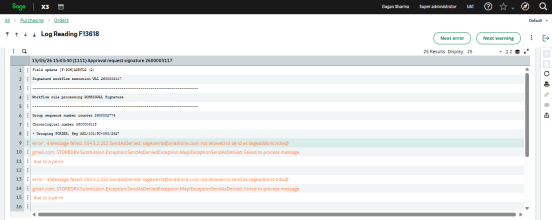
After detailed analysis, we found that the issue was related to the SMTP mail configuration and the way Sage X3 handled sender email addresses in older versions like 90.33. In the Notification Server setup, the SMTP sender mail account was configured properly and had permission to send emails. However, during workflow execution, Sage X3 was not using the configured SMTP sender mail directly. Instead, the system was picking the email address from the user master setup path :
All → Setup → Users → Workflow Email Address
Generally, this field contains the personal or official email ID of the user. Because of this behavior, when the workflow mail triggered after user signature, Sage X3 attempted to send the email using the user’s personal email ID instead of the SMTP configured sender account.
This created a permission issue on the mail server. Since the user’s personal email ID did not have SMTP sending authorization, the system generated a “Permission Denied” error and the workflow notification email failed (Fig1). To temporarily avoid this issue, if we entered the SMTP sender email ID in every user’s Workflow Email Address field, then the mail was triggered successfully. However, this was not the correct approach because that field is specifically intended for user email addresses and not for common SMTP sender configuration. Using the same SMTP sender mail in all user masters creates maintenance issues and also affects proper user-level email identification.
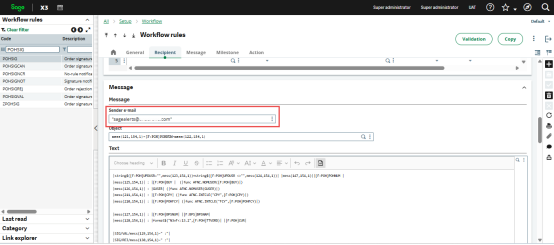
To resolve this limitation, Sage X3 introduced an enhancement in version 90.34 & above version. In this version, a separate Sender Email field is available directly inside the Workflow Rule configuration(Fig2). Because of this enhancement, the SMTP sender email can now be configured at workflow level instead of maintaining it in every user master record. This approach completely avoids the permission issue and provides a cleaner and more secure configuration for workflow email notifications.
About Us
Greytrix – a globally recognized and one of the oldest Sage Development Partners is a one-stop solution provider for Sage ERP and Sage CRM organizational needs. Being acknowledged and rewarded for multi-many years of experience and expertise, we bring complete end-to-end assistance for your technical consultations, product customizations, data migration, system integrations, third-party add-on development, and implementation competence.
Greytrix has some unique integration solutions developed for Sage CRM with Sage ERPs namely Sage X3, Sage Intacct, Sage 100, Sage 500, and Sage 300. We also offer best-in-class Sage ERP and Sage CRM customization and development services to Business Partners, End Users, and Sage PSG worldwide. Greytrix helps in the migration of Sage CRM from Salesforce | ACT! | SalesLogix | Goldmine | Sugar CRM | Maximizer. Our Sage CRM Product Suite includes addons like Greytrix Business Manager, Sage CRM Project Manager, Sage CRM Resource Planner, Sage CRM Contract Manager, Sage CRM Event Manager, Sage CRM Budget Planner, Gmail Integration, Sage CRM Mobile Service Signature, Sage CRM CTI Framework.
Greytrix is a recognized Sage Champion Partner for GUMU™ Sage X3 – Sage CRM integration listed on Sage Marketplace and Sage CRM – Sage Intacct integration listed on Sage Intacct Marketplace. The GUMU™ Cloud framework by Greytrix forms the backbone of cloud integrations that are managed in real-time for the processing and execution of application programs at the click of a button.
For more information on our integration solutions, please contact us at sage@greytrix.com. We will be glad to assist you.