
In the Sales Delivery screen of Sage X3, we have implemented a customization at the line level to support temporary delivery entry creation using a Provisional Quantity field along with the standard Delivered Quantity field.
Purpose of the Customization
This customization is designed to help users create delivery entries temporarily, even when the final delivery quantity is not yet confirmed.
Process Flow
Step 1: Enter Provisional Quantity
- The user can enter the required quantity in the Provisional Quantity field.
- The Delivered Quantity field can be left blank at this stage.
- The user can then create and save the Sales Delivery entry for temporary or draft purposes.
Validation Button Behaviour
When:
- Provisional Quantity is entered, and
- Delivered Quantity remains blank,
the Validation button on the Sales Delivery screen will remain disabled. See the screenshot below.
New Stuff: Managing QA Manager and Planner Access in Sage X3 Non-Conformance Screen
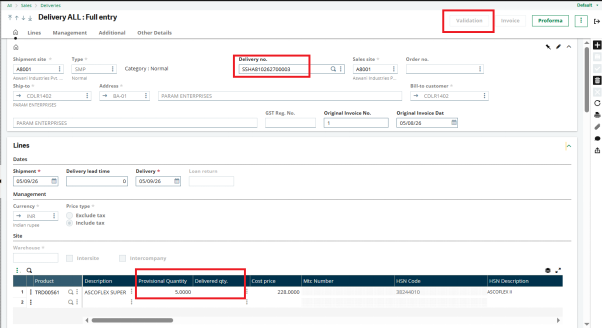
This behavior is intentional because the delivery is considered incomplete until the actual delivery quantity is entered.
Finalizing the Delivery
Whenever the user is ready to finalize the delivery:
- Open the existing Sales Delivery entry.
- Enter the actual quantity in the Delivered Quantity field.
- Once the Delivery Quantity is updated, the Validation button will automatically become enabled. See the screenshot below.
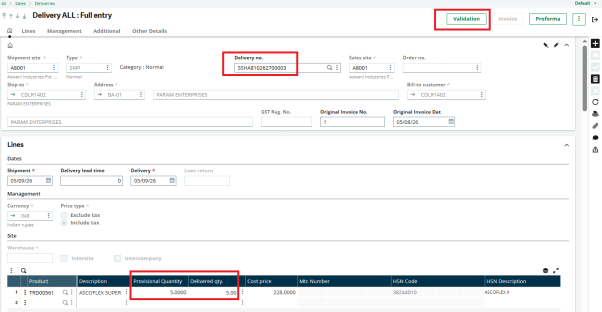
4. The user can then validate and complete the Sales Delivery transaction.
Benefits of This Customization
- Allows temporary creation of delivery entries.
- Helps users save incomplete delivery information for future processing.
- Prevents accidental validation of incomplete deliveries.
- Improves operational flexibility and process control.
Conclusion
This customization in the Sales Delivery screen provides users with a controlled and flexible way to manage temporary delivery transactions. By using the Provisional Quantity field, users can create draft entries and later finalize them by updating the Delivered Quantity, after which the system automatically enables the validation process.
About Us
Greytrix – a globally recognized and one of the oldest Sage Development Partners is a one-stop solution provider for Sage ERP and Sage CRM organizational needs. Being acknowledged and rewarded for multi-many years of experience and expertise, we bring complete end-to-end assistance for your technical consultations, product customizations, data migration, system integrations, third-party add-on development, and implementation competence.
Greytrix has some unique integration solutions developed for Sage CRM with Sage ERPs namely Sage X3, Sage Intacct, Sage 100, Sage 500, and Sage 300. We also offer best-in-class Sage ERP and Sage CRM customization and development services to Business Partners, End Users, and Sage PSG worldwide. Greytrix helps in the migration of Sage CRM from Salesforce | ACT! | SalesLogix | Goldmine | Sugar CRM | Maximizer. Our Sage CRM Product Suite includes addons like Greytrix Business Manager, Sage CRM Project Manager, Sage CRM Resource Planner, Sage CRM Contract Manager, Sage CRM Event Manager, Sage CRM Budget Planner, Gmail Integration, Sage CRM Mobile Service Signature, Sage CRM CTI Framework.
Greytrix is a recognized Sage Champion Partner for GUMU™ Sage X3 – Sage CRM integration listed on Sage Marketplace and Sage CRM – Sage Intacct integration listed on Sage Intacct Marketplace. The GUMU™ Cloud framework by Greytrix forms the backbone of cloud integrations that are managed in real-time for the processing and execution of application programs at the click of a button.
For more information on our integration solutions, please contact us at sage@greytrix.com. We will be glad to assist you.