
Effective project management requires accurate monitoring of work completion and progress. In Sage X3, the Work Order (WO) screen plays a vital role in managing project-related activities, tracking execution status, recording operational details, and monitoring project completion. To improve data accuracy and prevent incorrect progress reporting, a validation has been implemented for the Project Progress field on the Work Order screen.
Business Requirement
The Project Progress field is used to capture the completion percentage of a project. Since project progress is measured as a percentage, the entered value must always remain within a valid range. Previously, users could enter values greater than 100, which could lead to inaccurate project status reporting and inconsistencies in project management data.
Implemented Solution
A validation has been added to the Project Progress field on the Work Order (WO) screen. The system now checks the entered value and prevents users from saving or entering a value greater than **100**.
Validation Logic
Users can enter values from 0 to 100. System should accept. As per the screenshot below.
New Stuff: How Sage X3 Improves Customer Experience in Distribution & Compliance
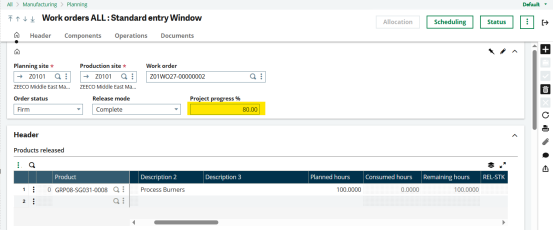
If a value greater than 100 is entered, the system displays a validation message. As per the screenshot below.
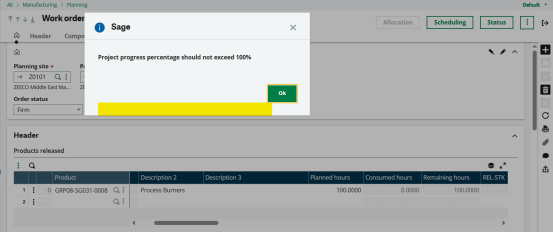
The transaction cannot proceed until a valid percentage value is provided.
Benefits
Improved Data Accuracy
Ensures that project completion percentages remain realistic and consistent across the system.
Better Reporting
Prevents incorrect progress values from affecting project tracking, dashboards, and management reports.
Enhanced User Experience
Provides immediate feedback to users, helping them correct data entry errors before saving the transaction.
Stronger Business Control
Maintains compliance with project management standards by enforcing logical percentage limits.
Conclusion
The Project Progress validation on the Work Order screen is a simple yet effective enhancement that strengthens data quality within Sage X3. By restricting values to a maximum of 100%, organizations can ensure more reliable project monitoring, reporting, and decision-making.
About Us
Greytrix – a globally recognized and one of the oldest Sage Development Partners is a one-stop solution provider for Sage ERP and Sage CRM organizational needs. Being acknowledged and rewarded for multi-man years of experience and expertise, we bring complete end-to-end assistance for your technical consultations, product customizations, data migration, system integrations, third-party add-on development, and implementation competence.
Greytrix has some unique integration solutions developed for Sage CRM with Sage ERPs namely Sage X3, Sage Intacct, Sage 100, Sage 500, and Sage 300. We also offer best-in-class Sage ERP and Sage CRM customization and development services to Business Partners, End Users, and Sage PSG worldwide. Greytrix helps in the migration of Sage CRM from Salesforce | ACT! | SalesLogix | Goldmine | Sugar CRM | Maximizer. Our Sage CRM Product Suite includes addons like Greytrix Business Manager, Sage CRM Project Manager, Sage CRM Resource Planner, Sage CRM Contract Manager, Sage CRM Event Manager, Sage CRM Budget Planner, Gmail Integration, Sage CRM Mobile Service Signature, Sage CRM CTI Framework.
Greytrix is a recognized Sage Champion Partner for GUMU™ Sage X3 – Sage CRM integration listed on Sage Marketplace and Sage CRM – Sage Intacct integration listed on Sage Intacct Marketplace. The GUMU™ Cloud framework by Greytrix forms the backbone of cloud integrations that are managed in real-time for the processing and execution of application programs at the click of a button.
For more information on our integration solutions, please contact us at sage@greytrix.com. We will be glad to assist you.