
Negative stock error during job work deliveries can disrupt operations. Even when sufficient stock is available according to Stock Inquiry, Negative stock error happens. This is critical in manufacturing environments to ensure uninterrupted production and delivery processes.
This article explains the issue, its root cause, the solution implemented, and how automating stock resynchronization through a recurring task in Sage X3 helped eliminate repeated manual intervention.
Issue: During Job Work Deliveries, users encountered the following issue:
•A Work Order was selected for delivery.
•The required product showed available stock in the Stock Inquiry.
•Despite sufficient stock availability, Sage X3 displayed a Negative Stock error.
As a result, the delivery transaction could not be completed.
This issue occurred repeatedly over several weeks, affecting day-to-day operations and requiring frequent support intervention.
Initial Solution: To resolve the issue, the Stock Resynchronization Utility was executed. As a result, stock balances were synchronized successfully, Negative Stock error disappeared, Users were able to complete the pending deliveries without any further issues.
Although the stock resynchronization utility resolved the immediate concern, the issue reoccurred after some time.
Root Cause: It was identified that the issue was caused by a mismatch between the inventory transactions and the stock balances maintained by Sage X3. While the Stock Inquiry reflected the correct stock quantity, the stock records used during delivery validation were temporarily out of synchronization. Consequently, the system incorrectly detected insufficient stock and blocked the transaction.
Running the Stock Resynchronization Utility synchronized these records and restored consistency.
Permanent Solution: A preventive approach was implemented instead of manually running the Stock Resynchronization Utility. A Recurring Task was created in Sage X3 to automatically execute the Stock Resynchronization Utility every two hours. This ensured the following:
•Automatic stock synchronization at regular intervals.
•Prevention of stock inconsistencies before they impact users.
•Elimination of repeated manual execution of the utility.
•Smooth processing of Job Work Deliveries.
•Reduced downtime and support requests.
•Improved operational efficiency.
Implementation of solution: The recurring task was configured in Sage X3 with the schedule of 2 hours as shown below:
New Stuff: How to Change Default Stock History Days in Sage X3
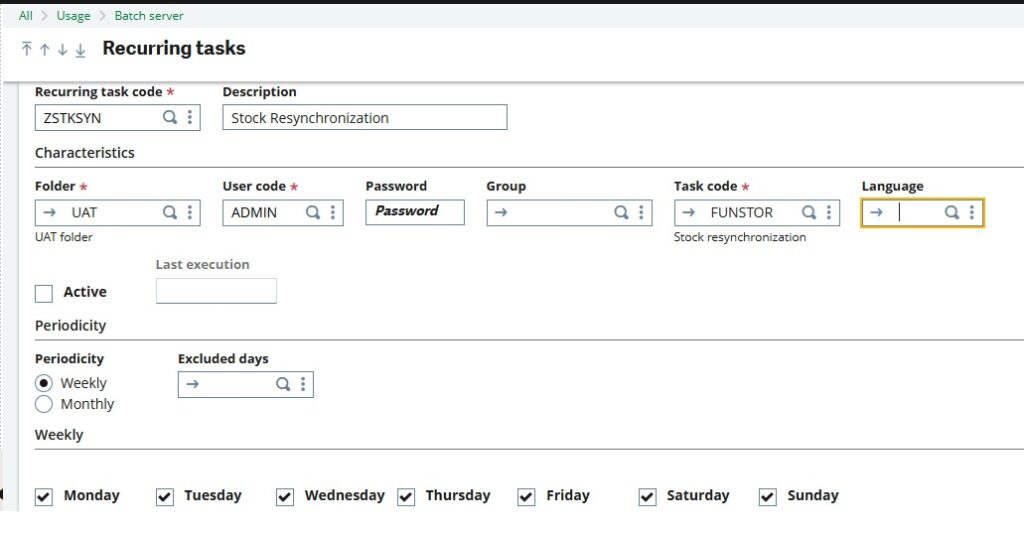
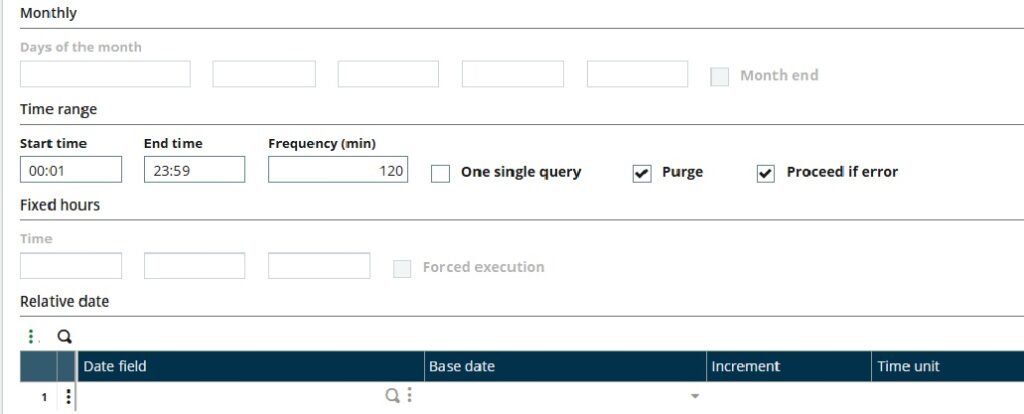
This ensures that stock data remains synchronized throughout the day without user intervention. As a result, after implementing the recurring task:
•No manual execution of the Stock Resynchronization Utility was required.
•Delivery transactions were processed successfully.
•Users no longer experienced frequent Negative Stock errors.
•The overall stability of the inventory process improved significantly.
Conclusion: Recurring Negative Stock errors can interrupt critical manufacturing and delivery operations, even when physical inventory is available. While manually running the Stock Resynchronization Utility resolves the issue temporarily, automating the process through a recurring task provides a more reliable and efficient solution.
About Us
Greytrix – a globally recognized and one of the oldest Sage Development Partners is a one-stop solution provider for Sage ERP and Sage CRM organizational needs. Being acknowledged and rewarded for multi-man years of experience and expertise, we bring complete end-to-end assistance for your technical consultations, product customizations, data migration, system integrations, third-party add-on development, and implementation competence.
Greytrix has some unique integration solutions developed for Sage CRM with Sage ERPs namely Sage X3, Sage Intacct, Sage 100, Sage 500, and Sage 300. We also offer best-in-class Sage ERP and Sage CRM customization and development services to Business Partners, End Users, and Sage PSG worldwide. Greytrix helps in the migration of Sage CRM from Salesforce | ACT! | SalesLogix | Goldmine | Sugar CRM | Maximizer. Our Sage CRM Product Suite includes addons like Greytrix Business Manager, Sage CRM Project Manager, Sage CRM Resource Planner, Sage CRM Contract Manager, Sage CRM Event Manager, Sage CRM Budget Planner, Gmail Integration, Sage CRM Mobile Service Signature, Sage CRM CTI Framework.
Greytrix is a recognized Sage Champion Partner for GUMU™ Sage X3 – Sage CRM integration listed on Sage Marketplace and Sage CRM – Sage Intacct integration listed on Sage Intacct Marketplace. The GUMU™ Cloud framework by Greytrix forms the backbone of cloud integrations that are managed in real-time for the processing and execution of application programs at the click of a button.
For more information on our integration solutions, please contact us at sage@greytrix.com. We will be glad to assist you.