• Who We Are
    • About Us
    • Factor - D
    • Our Networks
    • Accolades
  • What We Do

    SERVICES

    • Consulting / Implementation
    • Migration
    • Development

    OUR SOLUTIONS

    • GUMU Integration
    • BPortaly
    • Sales Commission
    • Shipping
    • IOT

    COMPREHENSIVE SERVICES FOR

    ERP

    • Acumatica
    • Sage Intacct
    • Sage X3
    • Sage 300
    • Sage 100
    • Sage 500

    CRM

    • Salesforce
    • D365 CRM
    • Sage CRM
    • Creatio

    Other Solutions

    • E-commerce
    • EDI
    • POS
  • Resources
    • Case Study
    • Blogs
    • Videos
    • Ebooks
    • News
  • +1 888 221 6661
Contact us
Career |
  • Africa
  • Middle East

Sage CRM – Tips, Tricks and Components

Explore the possibilities with Sage CRM insights through our comprehensive blogs. As a leading Sage partner, Greytrix helps businesses maximize their Sage CRM potential with its rich expertise and immense knowledge. Here, you will find blogs that feature expert advice, tips & tricks, best practices, and comprehensive guides on customizing and configuring Sage CRM for your business. Stay informed with our regular updates and expert insights!

Configuring Sage CRM Email Manager Credentials through Registry

By greysagecrm | August 21, 2017
26 Comments

We all are familiar with the Sage CRM installation process, its pre-requisites as well as the Configuration settings stored later. The Microsoft Registry Editor helps to find all the configuration details such as the CompanyName, DefaultDatabase, DefaultDatabaseServer, InstallDirName etc. However, I would like to share one such useful parameter stored in Microsoft Registry which is related/useful for Email Management module of Sage CRM.
Related Post: Invalid eWare user name error in Email Manager Service log
We have already explained the importance/link of CRM’s System Administrator User credentials with CRM’s Email Manager Service in above post. In this blog, I will share the alternate option of setting the credentials from Microsoft Registry.
1.   Execute Run command and type RegEdit to open Registry Editor.
2.    Navigate to the below path.
For 32-bit server:
In Registry Editor navigate to HKEY_LOCAL_MACHINE >> SOFTWARE>> eWare >>Config >>/<<CRM Instance>>
For 64-bit server:
In Registry Editor navigate to HKEY_LOCAL_MACHINE >> SOFTWARE >> Wow6432Node>> eWare >>Config >>/<<CRM Instance>>
3.    Here you can see the EMLogonId and EMPassword node. Right Click and select Modify data option.
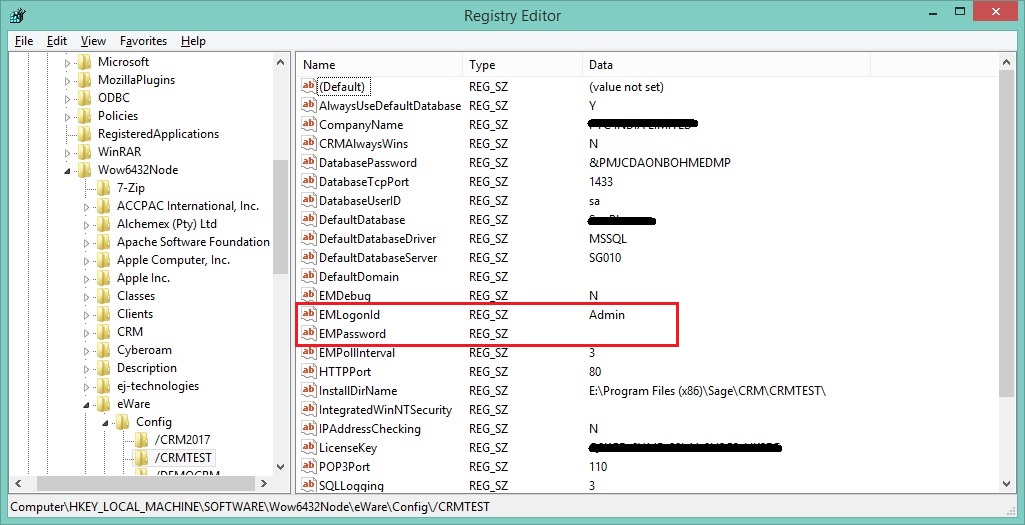
4.    Enter the correct CRM credentials into the Value data and click on OK button.
5.    Run IISRESET command to update details.
Also Read:
1.    Ways to Replace Sage CRM License Key
2.    CRM Email Manager Service failed to start
3.    Where to search for Sage CRM Configuration components
4.    DNS Server Settings
5.    Reverting IIS Auto Logon settings from CRM registry

Related Posts

  • Email Screen in Sage CRM 7.2
  • Greytrix Sage CRM Business Manager
  • Validate Email Addresses using Sage CRM Client Side API
Category: Configuration Editor Email Email Server Registration Registry Sage CRM User Name Tags: Configuring Sage CRM Email Manager Credentials through Registry, Email Management module, EMLogonId, EMPassword, Microsoft Registry Editor Sage CRM, regedit, Registry, sage crm email credentials
Post navigation
← Customizing Style Sheet of Sage CRM Reports Hide Merge to PDF option from New Menu in Sage CRM →

26 thoughts on “Configuring Sage CRM Email Manager Credentials through Registry”

  1. Pingback: Herbalife

  2. Pingback: house for sale hua hin

  3. Pingback: รับสร้างบ้าน

  4. Pingback: Engineering1

  5. Pingback: Scienc1e

  6. Pingback: วิธีการสมัครและการใช้งานแพลตฟอร์ม TAI SHAN

  7. Pingback: slot99

  8. Pingback: nagatop situs scam

  9. Pingback: fox888

  10. Pingback: โคมไฟ

  11. Pingback: ricky casino

  12. Pingback: Mostbet

  13. Pingback: Sarah

  14. Pingback: บาคาร่า ufa11k

  15. Pingback: heng678

  16. Pingback: รับจำนำ patek

  17. Pingback: jav

  18. Pingback: av ซับไทย

  19. Pingback: เกมคาสิโน casino 365

  20. Pingback: joker stoker slot

  21. Pingback: Aviator

  22. Pingback: ยูฟ่าเบท เว็บตรง ไม่ผ่านเอเย่นต์

  23. Pingback: clothing manufacturer

  24. Pingback: UOBilad

  25. Pingback: ระบบเทรด ea forex

  26. Pingback: как играть в авиатор

Comments are closed.

Greytrix Website and Blogs

    • Greytrix
    • GUMU™ Cloud
    • Greytrix Africa
    • Sage X3 – Tips, Tricks and Components
    • Sage 100 & 500 ERP Tips and Tricks
    • Sage 300 – Tips, Tricks and Components
    • Salesforce.com Tips and Tricks by Greytrix


sage crm integration

Recent Posts

  • Configuring a Custom Grid Using Query Grid Manager in Sage CRM (Integrated with Sage 100 using GUMU™)
  • Quick Line Entry (QLE) on Order and Quote Screen for Sage X3 and Sage Intacct
  • Enhancing Lot Tracking in GUMU™ for Sage CRM – Sage 100 Integration
  • New Enhancement in GUMU™ for Sage CRM – Sage Intacct Integration: Vendor.
  • Order and Quote Tabs Now Available in Both Company and Person Contexts

Archives

Awards

Premier Partner of the Year Premier Partner of the Year
Platinum Partner of the Year Platinum Partner of the Year
The CEO Story The CEO Story
Gold Partner pf the Year Gold Partner pf the Year
Top Excellence Distributor Top Excellence Distributor
  • na.sales@greytrix.com
  • +1 888 221 6661
  • B301, 3rd Floor, Everest Nivara Infotech Park, MIDC, Turbhe,
    Navi Mumbai 400 705. India

Our Global Locations >>

Who We Are

  • About Us
  • Factor - D
  • Our Network
  • Accolades
  • Career
  •  
  •  

Services

  • Consultation & Implementation
  • Migration
  • Development

Solutions

  • GUMUTM Integration
  • BPortaly
  • Sales Commission
  • Shipping
  • IOT
  •  
  •  

ERP

  • Acumatica
  • Sage Intacct
  • Sage X3
  • Sage 300
  • Sage 100
  • Sage 500

CRM

  • Salesforce
  • D365 CRM
  • Sage CRM
  • Creatio
  •  
  •  
  •  

Other Solutions

  • E-commerce
  • EDI
  • POS

Resources

  • Case Study
  • Blogs
  • Videos
  • E-books
  • News
  •  
  •  

Connect

  • Contact Us
  • Privacy Policy
  • Terms Of Use
  •  

© 2025. Greytrix, All Rights Reserved