
In today’s fast-moving supply chain environment, procurement teams face increasing pressure to respond quickly to business needs—especially when products come with multiple customization options. Dimensions, materials, finishes, configurations, or variant-specific requirements can dramatically increase the time needed to prepare accurate Requests for Quotation (RFQs).
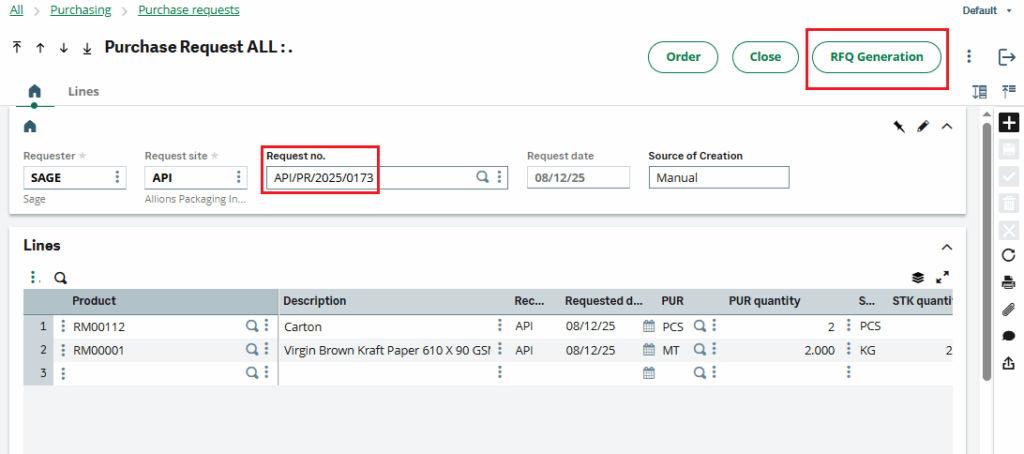
In Sage X3, our client has requested a single Request for Quotation (RFQ) based on the multiple products listed in the detail lines of a purchase request. with the following conditions.
1) As per the Purchase Request screen, for all products listed in the detail lines, only the top 10 suppliers should be loaded in the supplier details section on the RFQ screen.
2) If the same supplier is linked to two different products, it should appear only once.
3) After RFQs are generated using the RFQ Generation button, the user will not be able to manually add any additional suppliers to that RFQ.
As required, the system references the suppliers defined in the Product Master’s Supplier tab. From these suppliers, the top ten suppliers are automatically selected to generate individual RFQs. This blog outlines how we implemented this customization in Sage X3 to improve procurement efficiency.
Let’s examine the functionality in greater detail.
Navigate to : Purchase -> Purchase request
According to the requirement, the user first created a Purchase Request entry (API/PR/2025/0173) with the necessary products. As shown in Figure 1, two items—RM00112 and RM00001—were added to the detail lines. After clicking the RFQ Generation button, the system automatically generated a single RFQ, as illustrated in the screenshot below.
New Stuff:- How Sage X3 Supports Reliable Fintech Cash Flow Forecasting
In the Product Masters for RM00112 and RM00001, suppliers are assigned in the Supplier tab. During RFQ creation, the system automatically retrieves the top ten suppliers from this tab to generate the RFQs, as shown in Figures 2 and 3.)
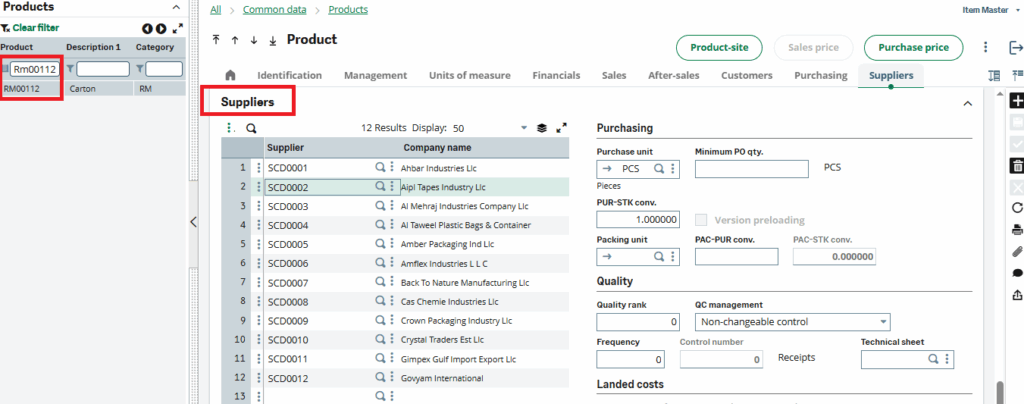
Product RM00112: Supplier Details Tab
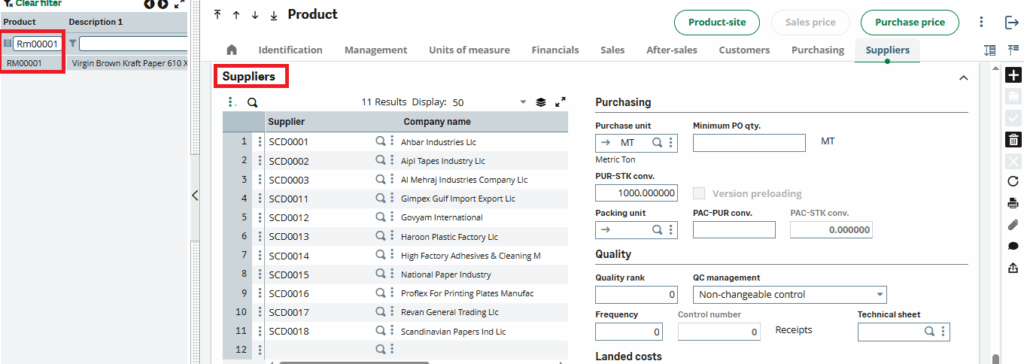
Product RM00001: Supplier Details Tab
After clicking the RFQ Generation button on the purchase request screen, a pop-up appears confirming that the RFQ was generated successfully (see Fig. 4).
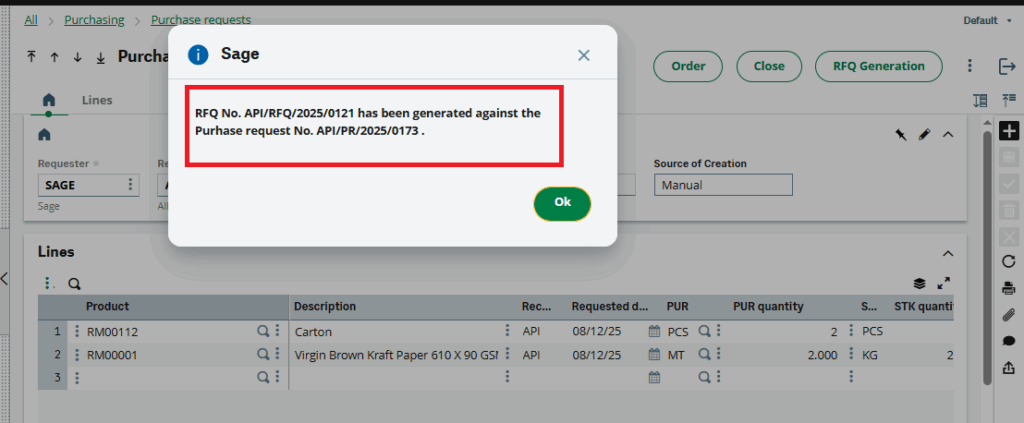
After clicking the OK button, we checked the Request for Quotation screen, and the RFQ entry (API/RFQ/2025/0120) was generated successfully (see Figs. 5 & 6). Additionally, after RFQ generation, the RFQ Generation button on the Purchase Request screen is automatically disabled to prevent duplicate creation.
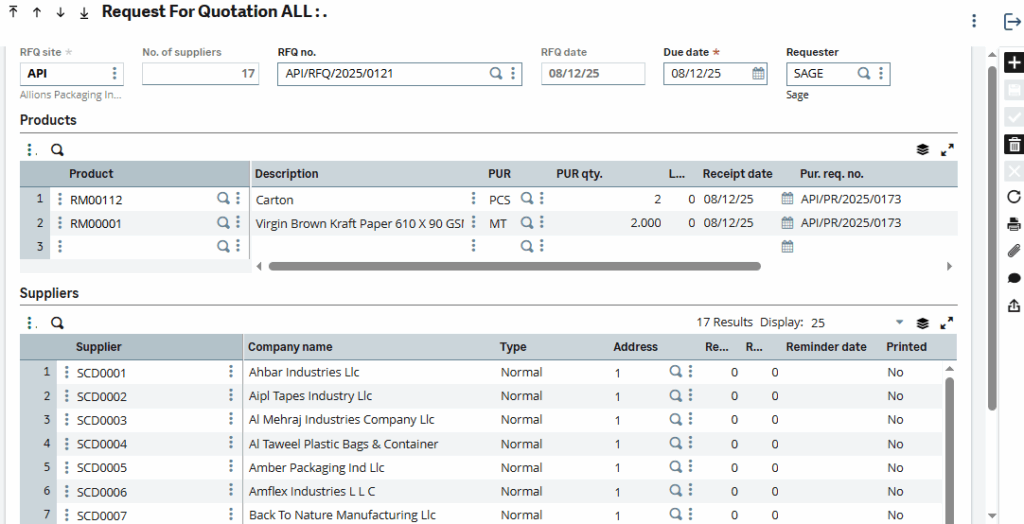
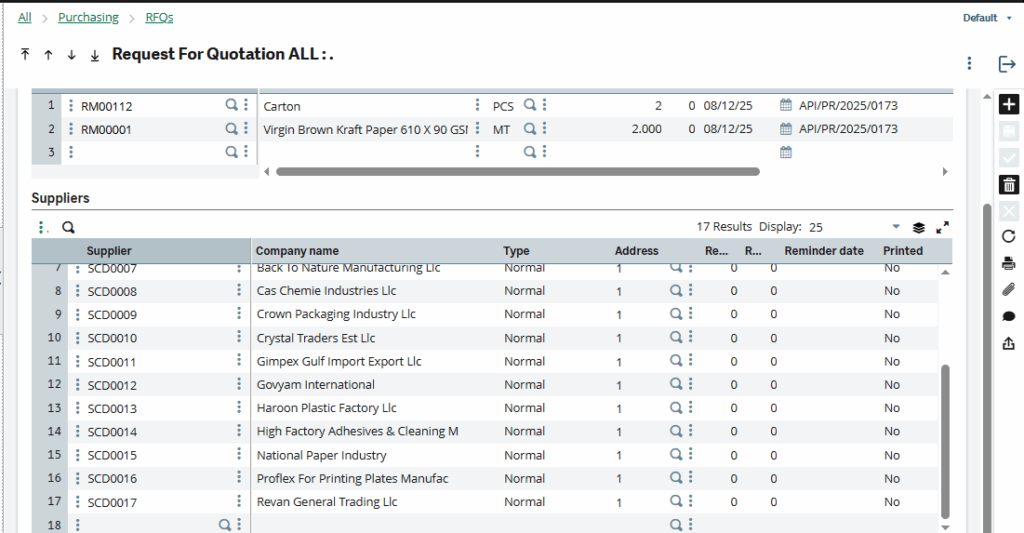
As per the above (fig 5 & 6) the single Request for Quotation (RFQ) is generated successfully with required conditions and based on the multiple products listed in the detail lines of a purchase request.
As demonstrated above, a single RFQ (Request for Quotation) supports multiple products from purchase request in Sage X3.
About Us
Greytrix – a globally recognized and one of the oldest Sage Development Partners is a one-stop solution provider for Sage ERP and Sage CRM organizational needs. Being acknowledged and rewarded for multi-man years of experience and expertise, we bring complete end-to-end assistance for your technical consultations, product customizations, data migration, system integrations, third-party add-on development, and implementation competence.
Greytrix has some unique integration solutions developed for Sage CRM with Sage ERPs namely Sage X3, Sage Intacct, Sage 100, Sage 500, and Sage 300. We also offer best-in-class Sage ERP and Sage CRM customization and development services to Business Partners, End Users, and Sage PSG worldwide. Greytrix helps in the migration of Sage CRM from Salesforce | ACT! | SalesLogix | Goldmine | Sugar CRM | Maximizer. Our Sage CRM Product Suite includes addons like Greytrix Business Manager, Sage CRM Project Manager, Sage CRM Resource Planner, Sage CRM Contract Manager, Sage CRM Event Manager, Sage CRM Budget Planner, Gmail Integration, Sage CRM Mobile Service Signature, Sage CRM CTI Framework.
Greytrix is a recognized Sage Champion Partner for GUMU™ Sage X3 – Sage CRM integration listed on Sage Marketplace and Sage CRM – Sage Intacct integration listed on Sage Intacct Marketplace. The GUMU™ Cloud framework by Greytrix forms the backbone of cloud integrations that are managed in real-time for the processing and execution of application programs at the click of a button.
For more information on our integration solutions, please contact us at sage@greytrix.com. We will be glad to assist you.