
In Sage X3, the Non-Conformance screen plays an important role in the Quality Control process. It is used to record, manage, and track issues related to products, materials, production processes, or deliveries that do not meet the required quality standards.
Whenever any defect, quality issue, damaged material, process deviation, or specification mismatch is identified during production, purchase receipt, subcontracting, or inventory inspection, a Non-Conformance record can be created in Sage X3. This helps organizations maintain proper quality tracking and ensures that corrective and preventive actions are taken on time.
The Non-Conformance functionality allows users to:
- Record quality-related issues in the system
- Track defective or rejected items
- Assign responsible users for review and action
- Monitor quality investigation and approval processes
- Maintain quality history and audit records
- Improve overall product and process quality
This screen is commonly used by:
- Quality teams
- Production departments
- Stores and inventory teams
- Purchase departments
- Subcontracting process users
In Sage X3, the Non-Conformance screen provides options to assign a QA Manager and Planner during the quality process. To ensure proper authorization and avoid incorrect user selection, Sage X3 provides parameter settings that control which users can be selected in these fields.
Standard Functionality –
In the user setup parameters, there are specific options available for:
- QA Manager
- Planner
When these parameters are set to “Yes” for a user, only then can that user be selected as a QA Manager or Planner on the Non-Conformance screen.
If the parameter is set to “No”, the user will not appear in the selection list for those fields.
Below is the step-by-step guide to enable and use this feature effectively.
QA Manager Parameter –
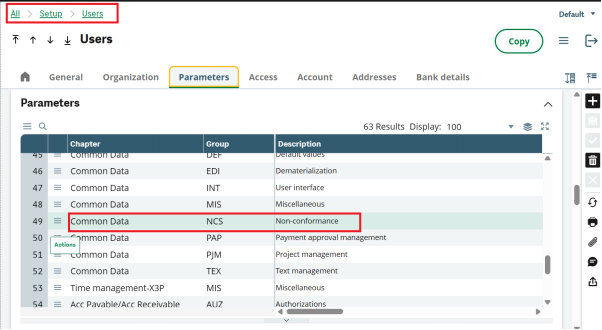
- Navigate to the user parameter setup.
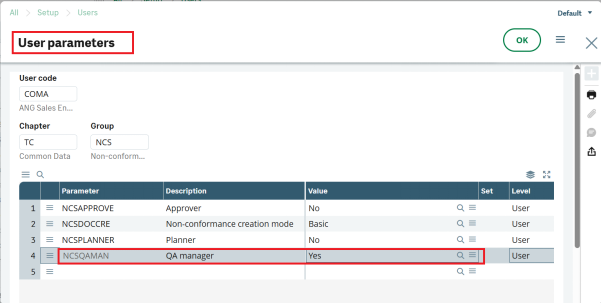
- Enable the QA Manager parameter by setting it to Yes for the required user.
After enabling this parameter, the user becomes available for selection in the QA Manager field on the Non-Conformance screen.
Refer the below screenshot for your reference –
New Stuff: How Catch Weight Add-On for Sage X3 Improves Inventory Accuracy
Planner Parameter –
- Similarly, enable the Planner parameter for users who should act as planners.
- Only users with this parameter set to Yes will be available in the Planner field.
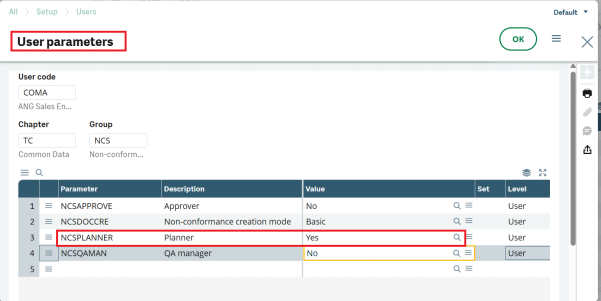
After enabling this setting, only users with the parameter set to Yes will be visible and selectable in the QA Manager and Planner fields.
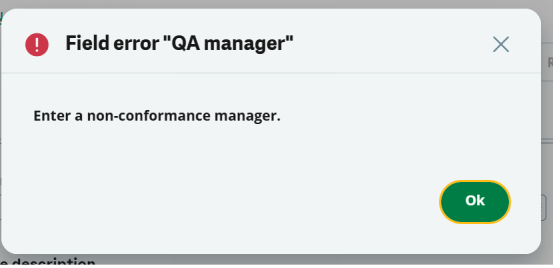
If a user who does not have this parameter enabled is selected in either of these fields, the system will automatically display a validation pop-up message and restrict the selection.
This standard Sage X3 functionality helps organizations control user responsibilities efficiently within the quality management process. By properly configuring the QA Manager and Planner parameters, businesses can ensure that only authorized users participate in Non-Conformance processing.
About Us
Greytrix – a globally recognized and one of the oldest Sage Development Partners is a one-stop solution provider for Sage ERP and Sage CRM organizational needs. Being acknowledged and rewarded for multi-many years of experience and expertise, we bring complete end-to-end assistance for your technical consultations, product customizations, data migration, system integrations, third-party add-on development, and implementation competence.
Greytrix has some unique integration solutions developed for Sage CRM with Sage ERPs namely Sage X3, Sage Intacct, Sage 100, Sage 500, and Sage 300. We also offer best-in-class Sage ERP and Sage CRM customization and development services to Business Partners, End Users, and Sage PSG worldwide. Greytrix helps in the migration of Sage CRM from Salesforce | ACT! | SalesLogix | Goldmine | Sugar CRM | Maximizer. Our Sage CRM Product Suite includes addons like Greytrix Business Manager, Sage CRM Project Manager, Sage CRM Resource Planner, Sage CRM Contract Manager, Sage CRM Event Manager, Sage CRM Budget Planner, Gmail Integration, Sage CRM Mobile Service Signature, Sage CRM CTI Framework.
Greytrix is a recognized Sage Champion Partner for GUMU™ Sage X3 – Sage CRM integration listed on Sage Marketplace and Sage CRM – Sage Intacct integration listed on Sage Intacct Marketplace. The GUMU™ Cloud framework by Greytrix forms the backbone of cloud integrations that are managed in real-time for the processing and execution of application programs at the click of a button.
For more information on our integration solutions, please contact us at sage@greytrix.com. We will be glad to assist you.