
Introduction
In project-based and manufacturing organizations, effective inventory control is vital for operational efficiency, profitability, and audit compliance. Materials are regularly issued to projects, production, subcontractors, or transferred between locations. Without proper controls, this often results in discrepancies, unapproved consumption, and weak traceability.
The new Material Requisition Slip (MRS) feature in Sage X3 solves this by introducing a structured, approval-based process for requesting, approving, issuing, and tracking materials.
Key Principle: No stock movement can happen without an approved MRS.
By integrating into existing processes like Misc. Issue and Stock Change, MRS brings much-needed visibility, accountability, and control — making it easy to trace who requested what, why, and whether it was properly authorized.
What is a Material Requisition Slip (MRS)?
A Material Requisition Slip (MRS) is a formal, pre-emptive document used to request materials from stores before any stock is issued, transferred, or supplied to vendors. It serves as the foundational record for all inventory movements and acts as the key reference for follow-on transactions such as Miscellaneous Issues and Stock Changes.
Unlike the previous process where stores could directly issue or transfer materials, the MRS introduces a mandatory step: the requester must first raise an MRS. Only after the MRS is created and approved can the stores team proceed with releasing or relocating the stock.
This transforms casual, informal material requests into a structured, traceable, approved, and fully auditable process.
New stuff: Fix Blank Specific Script Issue in Sage X3 Object When Creating New Window
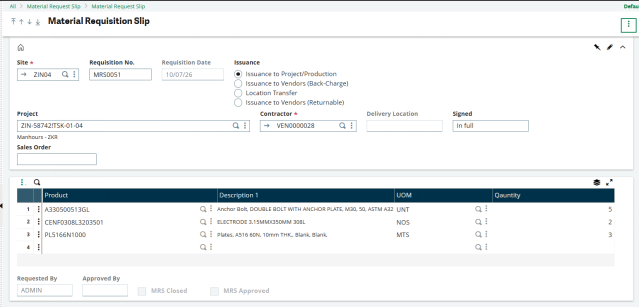
MRS Header Fields
Project Code with Task — Functions the same as the Project field on a Purchase Order, linking the requisition directly to a specific job.
Contractor/Subcontractor — The vendor raising the request, selected from the active vendor master.
Requisition No. — Automatically generated (no manual numbering required).
Date — Defaults to the current date and is non-editable.
Delivery Location — Automatically populated from the Subcontractor’s location in the vendor master.
MRS Closed and MRS Approved — Clear status flags that show the document’s current stage at a glance.
Purpose of Issuance: The Core ControlThe most important field in the Material Requisition Slip (MRS) is the Purpose of Issuance — a simple radio button selection that defines why the material is needed. This single choice determines how the system routes the MRS and handles the subsequent transaction.
| Purpose of Issuance | Routes To | What It Means |
| Issuance to Project/Production (Non-Chargeable) | Misc. Issue → “Non-Chargeable (NC)” | Materials are issued for internal use on a project or production job. Cost is charged to COGS. |
| Back-Charge (Issuance to Vendor) | Misc. Issue → “Back-Charge (BC)” | Materials are issued to a subcontractor/vendor, but the cost will be recovered by invoicing them. |
| Location Transfer | Stock Change → “Location Transfer” | Stock is moved from one warehouse/location to another without consumption. |
| Returnable (Issuance to Vendor) | Stock Change → “Returnable (RET)” | Materials or assets are temporarily issued to a vendor and are expected to be returned later. |
How MRS Works with Existing Transactions
1. Misc. Issue Screen
A new MRS No. field appears on the Misc. Issue screen.
When the store person selects an approved MRS, the system automatically populates the header details (Project, Vendor, Delivery Location, etc.) and line items.
The user only needs to confirm and issue the actual quantity from stock.
Key Behaviour:
For Non-Chargeable issuances: Stock is issued directly to the project/production job and accounted as COGS.
For Back-Charge issuances: Sage X3 automatically creates a Sales Order against the subcontractor (copying the MRS lines). Once the material is issued, a Sales Invoice can be generated to recover the cost from the vendor.
This creates a seamless and controlled flow for both internal consumption and cost recovery.
2. Stock Change Screen
A new MRS No. field is available for Location Transfer and Returnable types.
Selecting the MRS auto-fills the destination location and requested items.
The store user simply selects the stock to be moved.
Since these are physical movements only, no accounting journal is posted — the inventory value remains the same, only the location changes.
Details Section: What’s Being Requested
The line-item grid is deliberately streamlined to focus purely on the request:
Product Code
Description (automatically pulled from the product master)
UOM (Stock Unit of Measure)
Required Quantity There are no pricing or cost fields — reinforcing that the MRS is a request document, not a financial or inventory transaction.
Footer & Approval Workflow
Every MRS records:
Requested By — The user who created the requisition
Approved By — Automatically updated once the built-in approval process is completed
Every MRS follows an approval workflow. Once created, the request is routed to an authorized approver. Only approved MRS documents become available for stock transactions. This ensures that inventory movements are authorized and fully auditable.
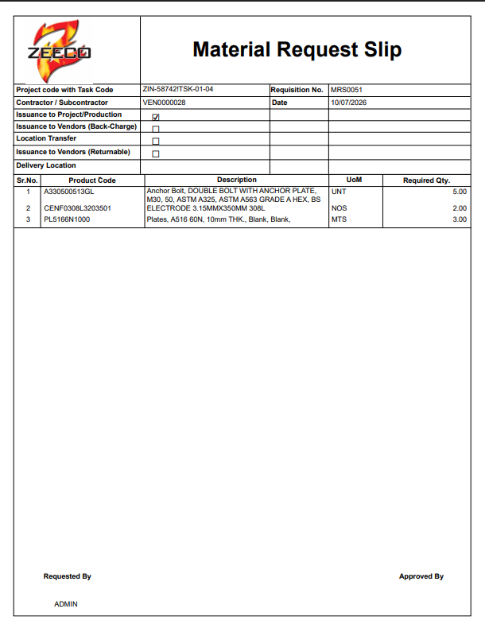
Additionally, the system automatically generates a printable MRS document, providing stores teams and requesters with a reliable physical or digital reference.
Business Benefits of MRS
• Stronger inventory governance
• Reduced unauthorized stock issues
• Enhanced project costing accuracy
• Improved subcontractor material tracking
• Complete audit trail for inventory movements
• Better compliance with internal controls
Conclusion
The Material Requisition Slip (MRS) enhancement in Sage X3 provides a structured framework for managing material requests and inventory movements. By integrating approvals, project tracking, vendor management, stock issues, and stock transfers into a single process, organizations gain better visibility, stronger controls, and improved operational efficiency. Whether materials are consumed internally, supplied to vendors, transferred between locations, or issued on a returnable basis, the MRS ensures that every movement is properly documented and traceable.
About Us
Greytrix – a globally recognized and one of the oldest Sage Development Partners is a one-stop solution provider for Sage ERP and Sage CRM organizational needs. Being acknowledged and rewarded for multi-man years of experience and expertise, we bring complete end-to-end assistance for your technical consultations, product customizations, data migration, system integrations, third-party add-on development, and implementation competence.
Greytrix has some unique integration solutions developed for Sage CRM with Sage ERPs namely Sage X3, Sage Intacct, Sage 100, Sage 500, and Sage 300. We also offer best-in-class Sage ERP and Sage CRM customization and development services to Business Partners, End Users, and Sage PSG worldwide. Greytrix helps in the migration of Sage CRM from Salesforce | ACT! | SalesLogix | Goldmine | Sugar CRM | Maximizer. Our Sage CRM Product Suite includes addons like Greytrix Business Manager, Sage CRM Project Manager, Sage CRM Resource Planner, Sage CRM Contract Manager, Sage CRM Event Manager, Sage CRM Budget Planner, Gmail Integration, Sage CRM Mobile Service Signature, Sage CRM CTI Framework.
Greytrix is a recognized Sage Champion Partner for GUMU™ Sage X3 – Sage CRM integration listed on Sage Marketplace and Sage CRM – Sage Intacct integration listed on Sage Intacct Marketplace. The GUMU™ Cloud framework by Greytrix forms the backbone of cloud integrations that are managed in real-time for the processing and execution of application programs at the click of a button.
For more information on our integration solutions, please contact us at sage@greytrix.com. We will be glad to assist you.