
Sage X3 is a highly flexible ERP system that allows businesses to configure transaction screens according to their specific processes. One of the most powerful features in Sage X3 is the Entry Transaction concept. Using Entry Transactions, the same document (such as Stock Change, Sales Order, Purchase Order, etc.) can behave differently based on the selected transaction code — fields can be hidden, displayed, made enterable, or even show different labels.
In real-life implementations, it is very common that the same physical field on a screen needs to represent different business meanings depending on the process being performed. Instead of creating multiple fields or multiple screens, Sage X3 provides a simple and elegant way to dynamically change the label of a field at runtime using the GFLAG variable and the Chgtzn instruction.
Requirement from Client –
Recently we received a requirement from one of our clients related to the Stock Change screen.
On the Stock Change screen, there is a field called Allocation Date (IPTDAT).
The same screen has multiple Entry Transactions. The client’s requirement was:
•When the Entry Transaction is ZDEL (Delivery related), the field label should appear as “DC Date”
•When the Entry Transaction is ZRCPT (Receipt related), the field label should appear as “RCP Date”
•For all other Entry Transactions, the label should remain as “Allocation Date”
New Stuff: Streamlining Internal and Capital Project Management in Sage X3 with Separate Project Sequences
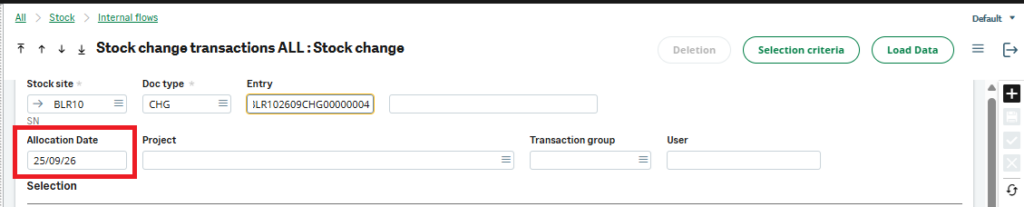
In Sage X3, we can easily achieve this by checking the value of the global variable GFLAG (which stores the current Entry Transaction code) and then using the Chgtzn instruction to change the field label dynamically.
Understanding the Key Concepts
•GFLAG: This variable holds the code of the currently selected Entry Transaction (for example: ALL, ZDEL, ZRCPT, etc.).
•Chgtzn: This is a 4GL instruction used to change the title (label) of a field on the screen.
•Syntax:
Chgtzn [M:ScreenCode]FieldCode With “New Label”
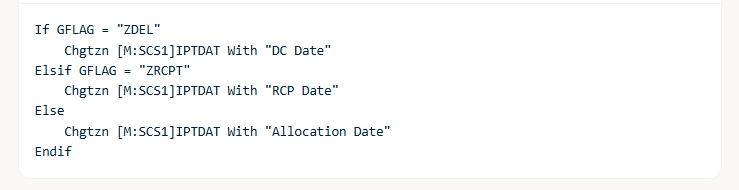
Here is the code that achieves the requirement:


Dynamically changing field labels using GFLAG and Chgtzn is a simple yet very effective technique in Sage X3. It allows consultants to meet client-specific requirements without creating extra fields or complex screen customizations.
In the above example, we successfully changed the meaning of the Allocation Date field on the Stock Change screen based on the selected Entry Transaction — showing “DC Date” for delivery, “RCP Date” for receipt, and “Allocation Date” for other processes — exactly as requested by the client.
About Us
Greytrix – a globally recognized and one of the oldest Sage Development Partners is a one-stop solution provider for Sage ERP and Sage CRM organizational needs. Being acknowledged and rewarded for multi-man years of experience and expertise, we bring complete end-to-end assistance for your technical consultations, product customizations, data migration, system integrations, third-party add-on development, and implementation competence.
Greytrix has some unique integration solutions developed for Sage CRM with Sage ERPs namely Sage X3, Sage Intacct, Sage 100, Sage 500, and Sage 300. We also offer best-in-class Sage ERP and Sage CRM customization and development services to Business Partners, End Users, and Sage PSG worldwide. Greytrix helps in the migration of Sage CRM from Salesforce | ACT! | SalesLogix | Goldmine | Sugar CRM | Maximizer. Our Sage CRM Product Suite includes addons like Greytrix Business Manager, Sage CRM Project Manager, Sage CRM Resource Planner, Sage CRM Contract Manager, Sage CRM Event Manager, Sage CRM Budget Planner, Gmail Integration, Sage CRM Mobile Service Signature, Sage CRM CTI Framework.
Greytrix is a recognized Sage Champion Partner for GUMU™ Sage X3 – Sage CRM integration listed on Sage Marketplace and Sage CRM – Sage Intacct integration listed on Sage Intacct Marketplace. The GUMU™ Cloud framework by Greytrix forms the backbone of cloud integrations that are managed in real-time for the processing and execution of application programs at the click of a button.
For more information on our integration solutions, please contact us at sage@greytrix.com. We will be glad to assist you.