
In Sage X3, purchase transactions are part of the Procurement and Inventory Management process. The process involves multiple stages such as Purchase Orders (PO), Goods Receipt (GRN), Purchase Invoices, and Purchase Returns. Managing these processes manually can often lead to errors, delays and data inconsistencies. To streamline operations and reduce manual intervention, automation plays a critical role.
For example, one of our clients required an enhancement to automatically generate a Purchase Return after posting a Purchase Invoice only when a quantity difference exists between the quantities on Purchase receipt screen.
Why Automate Purchase Returns?
A Purchase Return is created when goods received do not align with the required quantity. Traditionally, Purchase Returns are created manually after identifying discrepancies between the received quantity and the invoiced quantity. However, manual intervention and processing can lead to delays and operational inefficiencies.
Therefore, by automating the purchase return generation, Sage X3 can immediately detect any quantity mismatch between the purchase receipt and the purchase invoice and create return documents systematically. This ensures accuracy and efficiency across the Procurement and Inventory Management process.
Below is an outline of how we implemented this automation in Sage X3.
Step 1: Adding Custom fields
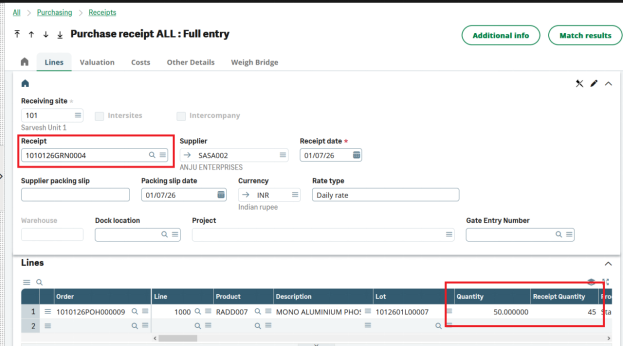
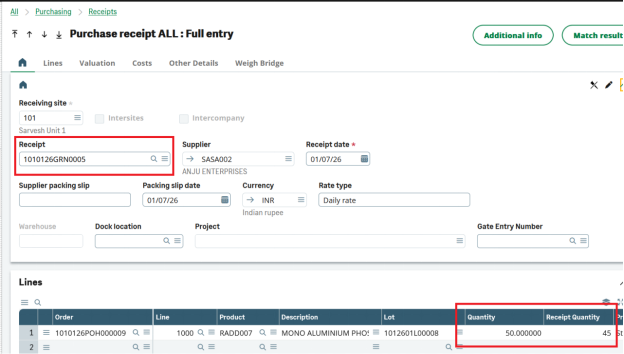
Custom fields were added to the Purchase Invoice and Purchase Return screens to display the Purchase Return number and Purchase Invoice number. Additionally, a custom field called “Receipt Quantity” was added to the Purchase Receipt screen. This field is used to calculate the quantity difference for generating the Purchase Return.
The return quantity is calculated using the following formula:
Return Quantity = Quantity – Receipt Quantity
Example:
A Purchase Order was created for a quantity of 100 units.
After that, two partial receipts (Goods Receipt Notes) were created for 50 quantity each, as shown in the figures below.
New stuff: Bank Posting Email Automation in Sage X3
Step 2: Creating Purchase Invoice for Multiple Receipts
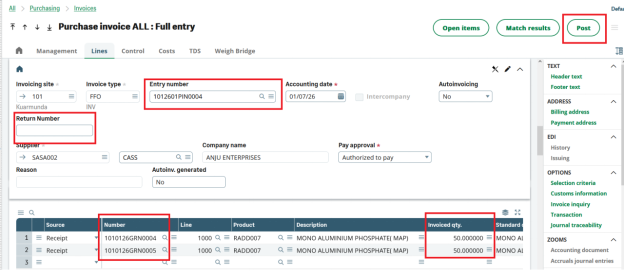
A single purchase invoice was created against two receipts (this example showcases the scenario of invoice created against multiple receipts)
Step 3: Posting the Purchase Invoice
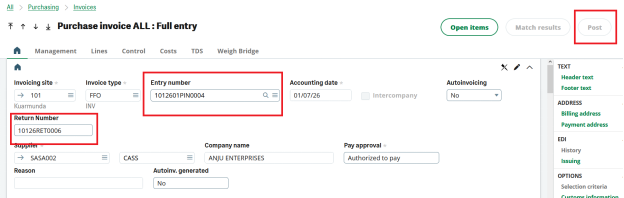
When the invoice is posted, the systems check for quantity differences between the receipt quantity and invoiced quantity. If a difference exists, a purchase return is generated with a pop-up message displayed.
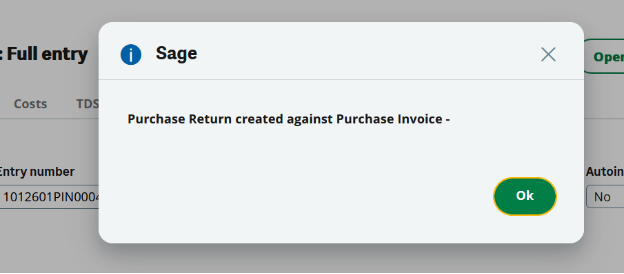
Below Figure display the return number generated, on invoice screen.
Step 4: Verifying the Purchase Return
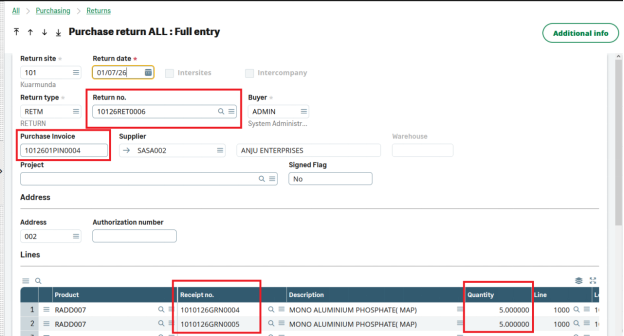
Navigate to purchase return screen and verify the return created against invoice.
The return of 5 units (50 – 45 = 5) quantity is created and the invoice number is also displayed on return screen against which the return is created.
Conclusion: Automating the creation of purchase returns immediately after posting purchase invoices significantly improves operational efficiency. By automatically detecting quantity differences and generating purchase return documents, organizations can reduce manual effort, minimize errors, and maintain accurate financial and inventory records.
About Us
Greytrix – a globally recognized and one of the oldest Sage Development Partners is a one-stop solution provider for Sage ERP and Sage CRM organizational needs. Being acknowledged and rewarded for multi-man years of experience and expertise, we bring complete end-to-end assistance for your technical consultations, product customizations, data migration, system integrations, third-party add-on development, and implementation competence.
Greytrix has some unique integration solutions developed for Sage CRM with Sage ERPs namely Sage X3, Sage Intacct, Sage 100, Sage 500, and Sage 300. We also offer best-in-class Sage ERP and Sage CRM customization and development services to Business Partners, End Users, and Sage PSG worldwide. Greytrix helps in the migration of Sage CRM from Salesforce | ACT! | SalesLogix | Goldmine | Sugar CRM | Maximizer. Our Sage CRM Product Suite includes addons like Greytrix Business Manager, Sage CRM Project Manager, Sage CRM Resource Planner, Sage CRM Contract Manager, Sage CRM Event Manager, Sage CRM Budget Planner, Gmail Integration, Sage CRM Mobile Service Signature, Sage CRM CTI Framework.
Greytrix is a recognized Sage Champion Partner for GUMU™ Sage X3 – Sage CRM integration listed on Sage Marketplace and Sage CRM – Sage Intacct integration listed on Sage Intacct Marketplace. The GUMU™ Cloud framework by Greytrix forms the backbone of cloud integrations that are managed in real-time for the processing and execution of application programs at the click of a button.
For more information on our integration solutions, please contact us at sage@greytrix.com. We will be glad to assist you.