
In any ERP system, controlling transaction dates is essential to maintain data accuracy, ensure compliance, and prevent unauthorized backdated or future entries. In Sage X3, this control can be efficiently managed using User Parameters, allowing organizations to define date restrictions at an individual user level.
Many businesses face challenges such as users entering transactions in closed periods, creating backdated purchase or sales documents, or posting entries beyond allowed accounting timelines. These issues can lead to reporting inconsistencies and audit complications.
To address this, Sage X3 provides a powerful yet often underutilized feature within User Parameters (Common Data) that enables date control across multiple modules — including Sales, Purchase, Accounting, and A/P–A/R. By configuring parameters like start and end dates, organizations can restrict users from creating or modifying transactions outside the permitted date range.
In this blog, we will explore how to use these parameters effectively to control transaction entries, improve data governance, and reduce dependency on custom validations.
Below is a step-by-step guide to configure user-based date restriction parameters in Sage X3 –
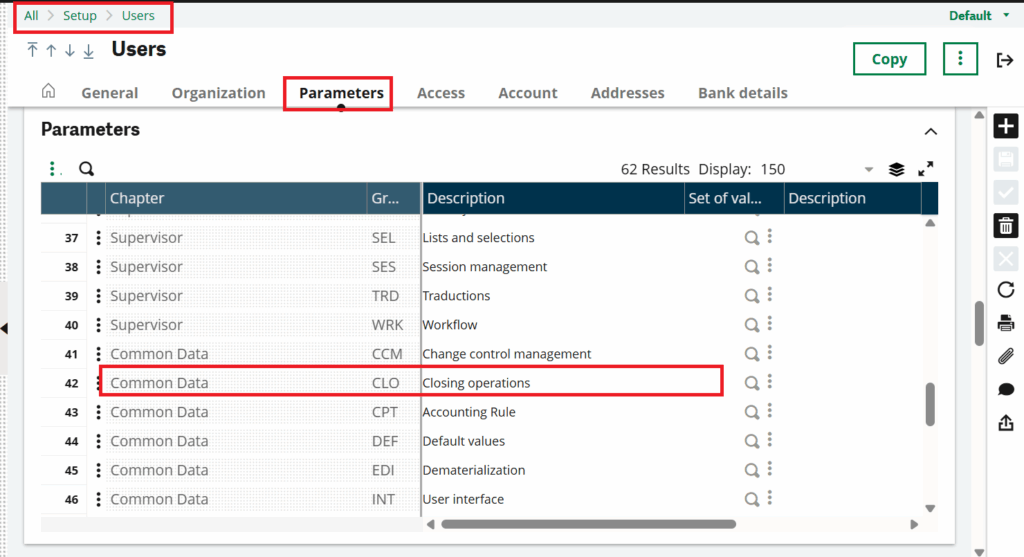
Step 01 – Navigate to the path mentioned below. In this section, we will use A/P–A/R accounting parameters as an example. Please refer to the screenshot below for better understanding.
Path – All >> Setup >> Users >> Parameters >> Common Data >> CLO (GRP)
New Stuff: Sales Invoice Quantity Control Aligned with Sales Order in Sage X3.
Step 02 – Click on the three dots for the CLO group and select “Details.” Here, you will see different start and end date options for various modules. In this example, we have set the A/P–A/R accounting end date and start date for a user. Please refer to the screenshot below for reference.
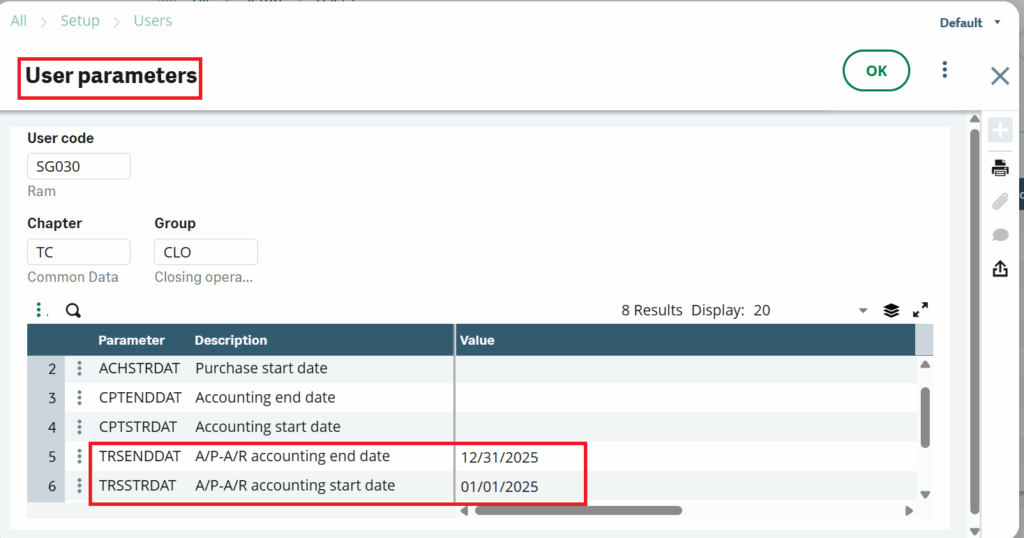
Step 03 – Click the “OK” button to confirm and save all changes.
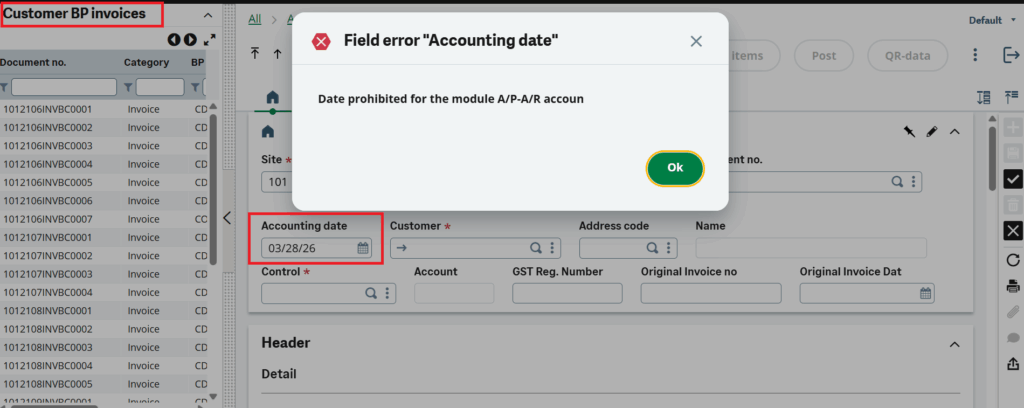
Step 04 – To verify the configuration, navigate to any A/P–A/R accounting screen and attempt to enter a date outside the defined range (before the start date or after the end date). The system will display a pop-up message indicating the date restriction. Please refer to the screenshot below for better understanding.
By configuring start and end dates across Sales, Purchase, Accounting, and A/P–A/R modules, businesses can prevent unauthorized backdated or future-dated entries and enforce proper transactional discipline at the user level. This not only improves data accuracy but also simplifies audit processes and strengthens internal controls. With Sage X3, this requirement can be effectively addressed using User Parameters, without the need for complex customization.
In conclusion, before opting for customization, it is always recommended to leverage this powerful standard feature in Sage X3, as it provides a simple, efficient, and scalable way to manage transaction date restrictions across the system.