
To resolve the “File too large” error encountered when uploading files in Sage X3, particularly when dealing with larger file types such as documents, images, or patch files, you can increase the file upload limit. This adjustment can be made by modifying the nodelocal.js configuration file, which is part of the Syracuse component in the Sage X3 setup.
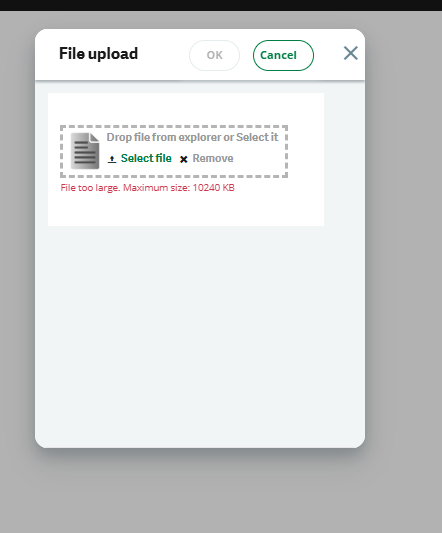
Fig. 1 Error while patch integration
Steps to Solve the “File too large” Error in Sage X3:
- Navigate to the nodelocal.js File: The nodelocal.js file controls various configurations for the Syracuse services. To modify the file upload limit, you first need to locate it. You can find this file at the following path (depending on your Sage X3 installation): “D:\Sage\SyracuseComponent\syracuse\bin” Note: The path may vary depending on your specific installation setup, so if you’re unable to find it there, check your installation directories for SyracuseComponent.
- Add the Code Snippet to Increase the File Upload Limit: Within the nodelocal.js file, you need to add the following code snippet to increase the allowed upload size. This will set the default maximum upload size to 20 MB and allow a patch file to be uploaded with a maximum size of 500 MB.
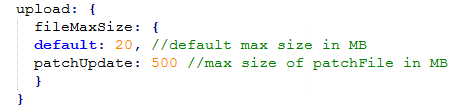
Fig.2 snippet to add in nodelocal.js
Explanation of the Parameters:
- default: 20 — This sets the default maximum file size for regular uploads to 20 MB.
- patchUpdate: 500 — This increases the upload size limit for patch files to 500 MB, which is useful when dealing with large update files.
3. Save the Changes: After adding the snippet, save the file. Make sure there are no syntax errors in the file after modification to avoid any configuration issues when the system reloads.
4. Restart Syracuse Services: After modifying the nodelocal.js file, you will need to restart the Syracuse services to apply the changes. This can typically be done through the Sage X3 administration console.
5.Test the Upload: Once the system is back online, test uploading a larger file (up to the new size limit) to ensure that the changes have taken effect and that the file upload limit has been successfully increased.
Thus, by following these steps and modifying the nodelocal.js file, you can increase the file upload size limit in Sage X3, enabling the system to accept larger files (e.g., documents or patch files). Just ensure that the changes are properly applied and the system is restarted for the new settings to take effect.