
In the standard Sage X3 process, Miscellaneous Receipt entries are accounted for in the General Ledger through predefined accounts maintained in the Automatic Journal (commonly STKEN). Although this method is suitable for regular scenarios, it lacks the flexibility to determine the credit account based on a user-selected Reason Code.
A recent client requirement, When a Miscellaneous Receipt is created and the Account Interface is run, the credit line in the resulting GL entry should use the Account Code linked to the Reason Code selected by the user on the receipt screen (instead of a fixed standard account).
We implemented configurable solution using a Miscellaneous Table + custom field mapping in the Automatic Journal.
Step 1 : . Reason Code & Account Code Mapping (Miscellaneous Table 19138)
– A new Miscellaneous Table 19138 – Reason Code for misc issue was created.- Users maintain the mapping here (Code → Description → Account Code in Short description). Please see Fig 1.
– A new Miscellaneous Table 19138 – Reason Code for misc issue was created.
– Users maintain the mapping here (Code → Description → Account Code in Short description). Please see Fig 1.
New Stuff:- How to Decode Base64 to a File in Sage X3 Using 4GL
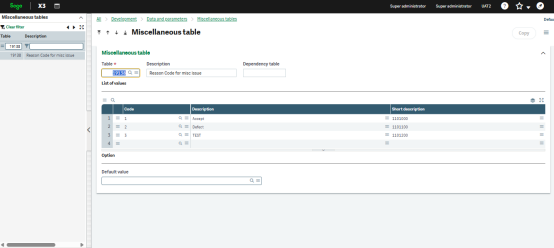
This table becomes the single source of truth. Finance or master-data teams can add or change mappings without any development.
Step 2 : Entry Creation – Automatic Population of Account Code
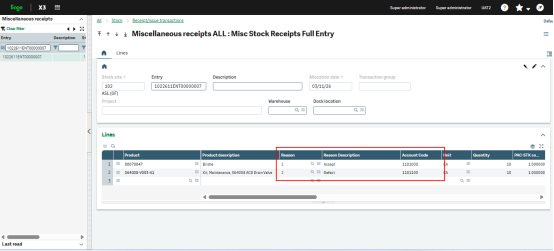
On the Miscellaneous Receipts screen (Misc Stock Receipts Full Entry):
– User selects the Reason using the finder.
– The system automatically populates the corresponding Account Code in the product line (from the mapping maintained in table 19138). Please see Fig 2
Step 3 : GL Posting via Automatic Journal (STKEN)
The key technical step was to make the Automatic Journal pick up the Account Code stored on the receipt line.
In Automatic Journals → STKEN → Formulas tab:
– On the Stock variation line (the credit line – usually line 2 & 3 )
– For the field Account Legal >> Account Legal >> The formula was set to: num$([F:SMD]ZACC). Please see Fig 3 (Stock variation line 2 ) – For the field Account Legal >> Account Legal >> The formula was set to: num$([F:SMD]ZACC). Please see Fig 4 (Stock adjustment line 3)
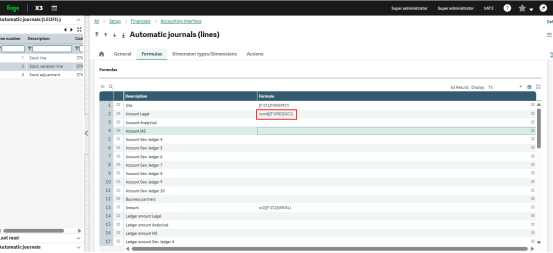
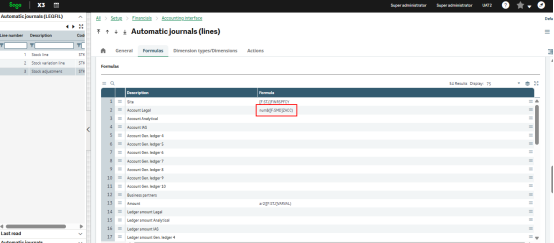
This formula reads the Account Code field (ZACC) from the Miscellaneous Receipt detail line and passes it to the GL entry.
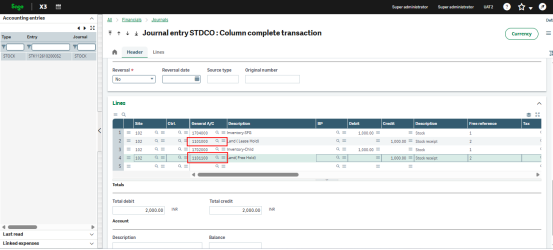
After running the Account Interface, the generated journal clearly shows the dynamic accounts:
– Debit lines use the standard inventory / stock accounts. – Credit lines use the Reason-driven accounts (1101000, 1101100, etc.) exactly as selected by the user on the receipt. Please see Fig 5
About Us
Greytrix – a globally recognized and one of the oldest Sage Development Partners is a one-stop solution provider for Sage ERP and Sage CRM organizational needs. Being acknowledged and rewarded for multi-man years of experience and expertise, we bring complete end-to-end assistance for your technical consultations, product customizations, data migration, system integrations, third-party add-on development, and implementation competence.
Greytrix has some unique integration solutions developed for Sage CRM with Sage ERPs namely Sage X3, Sage Intacct, Sage 100, Sage 500, and Sage 300. We also offer best-in-class Sage ERP and Sage CRM customization and development services to Business Partners, End Users, and Sage PSG worldwide. Greytrix helps in the migration of Sage CRM from Salesforce | ACT! | SalesLogix | Goldmine | Sugar CRM | Maximizer. Our Sage CRM Product Suite includes addons like Greytrix Business Manager, Sage CRM Project Manager, Sage CRM Resource Planner, Sage CRM Contract Manager, Sage CRM Event Manager, Sage CRM Budget Planner, Gmail Integration, Sage CRM Mobile Service Signature, Sage CRM CTI Framework.
Greytrix is a recognized Sage Champion Partner for GUMU™ Sage X3 – Sage CRM integration listed on Sage Marketplace and Sage CRM – Sage Intacct integration listed on Sage Intacct Marketplace. The GUMU™ Cloud framework by Greytrix forms the backbone of cloud integrations that are managed in real-time for the processing and execution of application programs at the click of a button.
For more information on our integration solutions, please contact us at sage@greytrix.com. We will be glad to assist you.