
Sage X3 is a powerful ERP solution designed to streamline business processes such as procurement, inventory, and financial management. Its flexibility allows businesses to customize workflows to meet specific requirements, including automation of procurement tasks.
One of our clients requested that the system enforce validation controls in the sales invoice to restrict users from entering quantity values that exceed the corresponding values defined in the sales order. Sage X3, by being as flexible as possible, meets this requirement.
Let’s examine the functionality in greater detail.
Navigate to : Sales -> Sales order
According to this requirement, the user first created a sales order entry transaction (GIB260102SO00113) with the required quantity and other details.
New Stuff:- Automatic Purchase Return Generation After Purchase Invoice Posting in Sage X3
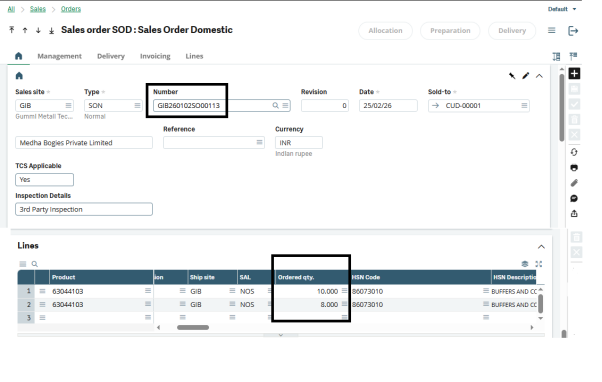
As shown in Figure 1, in the sales order GIB260102SO00113, there are two detail lines with the same product but different quantities. In the first line, the product 63044103 has a quantity of 10, and in the second line, the same product 63044103 has a quantity of 8.
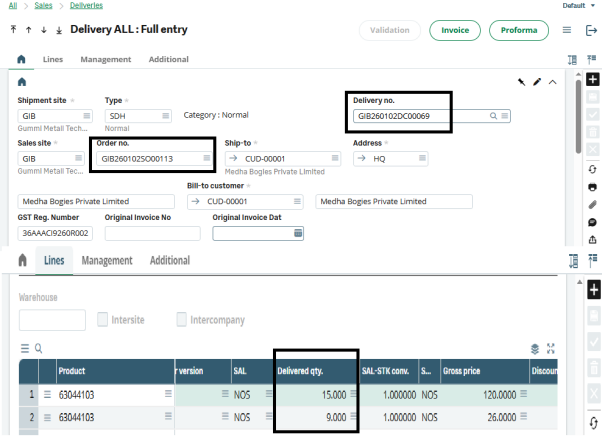
As per the process, the user is creating a sales delivery (GIB260102DC00069) against the sales order (GIB260102SO00113). The user has exceeded the quantities of both lines as per their requirement, as shown in the figure below.In the sales delivery entry (GIB260102DC00069), the quantity in the first line is 15, and the quantity in the second detail line is 9.
Now, as per the process, the user is creating a sales invoice against the sales delivery (GIB260102DC00069). According to the client’s requirement, a restriction is applied at this stage. As shown below, the system restricts the invoice entry creation and displays a pop-up message with the required information.
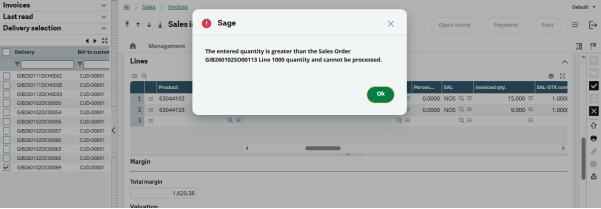
Here, as per the first line, the system restricts the entry creation and displays the following pop-up message:”The entered quantity is greater than the Sales Order GIB260102SO00113 Line 1000 quantity and cannot be processed.”
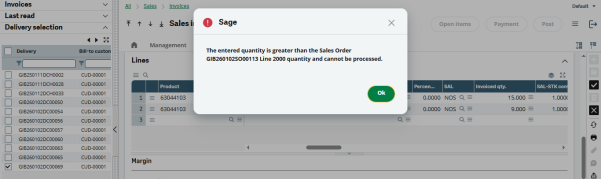
Here, for the second line, the system restricts the entry creation and displays the following pop-up message:
“The entered quantity is greater than the Sales Order GIB260102SO00113 Line 2000 quantity and cannot be processed.”As demonstrated above, the Sales Invoice Quantity Control restriction/validation aligned with the Sales Order is working correctly in Sage X3.
About Us
Greytrix – a globally recognized and one of the oldest Sage Development Partners is a one-stop solution provider for Sage ERP and Sage CRM organizational needs. Being acknowledged and rewarded for multi-man years of experience and expertise, we bring complete end-to-end assistance for your technical consultations, product customizations, data migration, system integrations, third-party add-on development, and implementation competence.
Greytrix has some unique integration solutions developed for Sage CRM with Sage ERPs namely Sage X3, Sage Intacct, Sage 100, Sage 500, and Sage 300. We also offer best-in-class Sage ERP and Sage CRM customization and development services to Business Partners, End Users, and Sage PSG worldwide. Greytrix helps in the migration of Sage CRM from Salesforce | ACT! | SalesLogix | Goldmine | Sugar CRM | Maximizer. Our Sage CRM Product Suite includes addons like Greytrix Business Manager, Sage CRM Project Manager, Sage CRM Resource Planner, Sage CRM Contract Manager, Sage CRM Event Manager, Sage CRM Budget Planner, Gmail Integration, Sage CRM Mobile Service Signature, Sage CRM CTI Framework.
Greytrix is a recognized Sage Champion Partner for GUMU™ Sage X3 – Sage CRM integration listed on Sage Marketplace and Sage CRM – Sage Intacct integration listed on Sage Intacct Marketplace. The GUMU™ Cloud framework by Greytrix forms the backbone of cloud integrations that are managed in real-time for the processing and execution of application programs at the click of a button.
For more information on our integration solutions, please contact us at sage@greytrix.com. We will be glad to assist you.