
Implementing Sage X3 in your business involves reviewing finance, purchasing, inventory, manufacturing, sales, and supply chain processes, then configuring Sage X3 to support them.
A well-planned implementation provides a unified source of master data, workflows, controls, and reporting, streamlining operations. But poor planning can lead to inaccurate data, scope changes, excess customization, delays, and low user adoption.
Sage X3 implementation is the structured process of deploying and configuring Sage X3 to support business processes. It typically includes everything from requirements analysis to data migration, testing, and go-live.
Greytrix supports Sage X3 projects through planning, design, configuration, data migration, integrations, testing, training, go-live, and post-live support.
Why Is a structured Sage X3 Implementation Important?
Sage X3 unifies finance, manufacturing, inventory, purchasing, sales, and supply chain. It also supports multi-company, multi-site, multi-currency, and multi-language needs for organizations operating across multiple locations. But these capabilities only create value when the system is implemented around well-defined business processes.
Implementation decisions directly affect data quality, workflow efficiency, user adoption, and long-term upgradability. Because:-
- Poor requirements or scope control can lead to implementation delays and budget overruns.
- Poor data migration can affect reporting accuracy and day-to-day operations.
- Limited user training can leave employees dependent on spreadsheets and workarounds.
- Excessive customization can increase system complexity and future upgrade effort.
Preparing for Sage X3 Implementation
A multi-site, multi-entity Sage X3 rollout implementation can take 9–18 months depending on project complexity. A clear Sage X3 implementation plan, a defined scope, and an early implementation strategy can reduce rework and keep the project on track.
- What business processes and outcomes do you want to improve with Sage X3?
- How do your current business processes work, and where are the main gaps?
- Who will be responsible for making key decisions throughout the implementation?
The answers to these questions should help define your objectives, success metrics, core processes, and areas for standardization as part of your ERP planning guide.
Preparation should also cover the systems and resources required for the project. Identify integrations such as EDI, WMS, e-commerce, BI, payroll, and tax systems, while accounting for licenses, implementation services, training, change management, and contingency.
Key areas to prepare include:
- Business readiness: Define objectives, success measures, scope, and decision ownership.
- Process readiness: Document core processes and identify where standardization is needed.
- Data readiness: Profile, cleanse, map, and validate legacy data.
- Integration readiness: Identify connected systems and define data flows and error handling.
- Resource readiness: Plan project roles, budget, training, and change management.
- Go-live readiness: Prepare testing, cutover, rollback, and hypercare plans.
If the preparation process feels complex or overwhelming, an experienced Sage X3 partner can add value early in the project.
Greytrix works with businesses to assess requirements, define the implementation scope, review processes, identify integration needs, and plan data migration before configuration begins.
Phases of Sage X3 Implementation
Sage X3 implementation process is a multi-phase project covering requirements, solution design, configuration, data preparation, testing, training, and deployment.
The Sage X3 implementation steps can be grouped into six connected phases: Planning → Analysis → Design → Build → Test → Deploy, with activities such as data migration, training, go-live, and hypercare carried out across the relevant stages.
1. Discovery & Planning – Define business objectives, scope, stakeholders, timeline, budget, and project governance.
Key outputs: Project charter, high-level plan, and governance model.
2. Business Process & Requirements Analysis – Review current processes, conduct functional workshops, and identify gaps and requirements.
Key outputs: To-be process maps, requirements specifications, and initial design.
3. Solution Design – Define the solution architecture, including master data, workflows, approvals, integrations, and reporting.
Key outputs: Solution blueprint, configuration and integration designs, and test strategy.
4. Configuration, Development & Data Preparation – Configure Sage X3, develop required custom objects and integrations, and prepare legacy data.
Key outputs: Configured system, custom objects, integration endpoints, and data templates.
5. Testing & User Acceptance – Perform unit and integration testing, run real business scenarios, resolve issues, and complete UAT.
Key outputs: Tested solution, UAT sign-off, and draft cutover plan.
6. Deployment, Go-Live & Hypercare – Complete final data migration, move to production, train users, and stabilize operations through hypercare.
Key outputs: Live system, stabilized operations, and transition to ongoing support.
Data quality, scope changes, complexity, customization, testing gaps, and user adoption can still impact the project’s timeline, cost, and outcome.
You can refer to this article for an in-depth look at the implementation phases.
These phases also show why Sage X3 implementation requires both functional and technical expertise. Greytrix brings together functional consultants across finance, supply chain, manufacturing, and sales with technical, data migration, project management, and training roles to manage the different requirements that emerge across the implementation lifecycle.
Sage X3 Implementation Cost, Timeline & Challenges
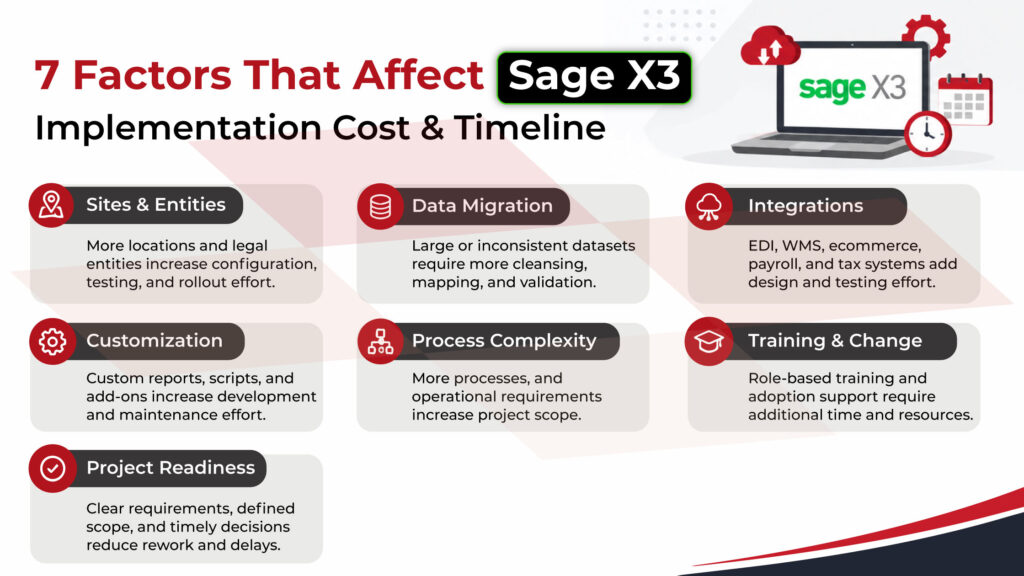
Sage X3 implementation costs and timelines vary with project scope and complexity. Research benchmarks put partner fees at 1.5–3× the first-year licensing cost. Other costs can come from data migration, integrations, custom reports, WMS requirements, tax integrations, hosting, and internal staff time.
Rather than relying on a single cost or timeline estimate, businesses should assess the factors that will shape their own implementation. The key factors include:
Common Challenges in Sage X3 Implementation
The factors above can become implementation challenges when they are not addressed early. Some of the most common include:
- Scope changes and unclear decision ownership
Adding sites, reports, integrations, or features after project start can cause rework and extend timelines. Clear decision ownership and change control can help. - Configuring before processes are defined
Starting configuration before agreeing on future-state processes can lead to repeated reconfiguration and may carry existing process problems into the new ERP. - Poor data quality
Duplicates, inconsistent codes, missing BOMs, and inaccurate inventory data can surface during UAT or cutover, delaying migration and affecting go-live. Data migration should therefore involve business teams, not just IT. - Excessive customization
Customizations may be necessary for specific business requirements, but they can increase development effort, system complexity, and future upgrade considerations. Use Standard Sage X3 functionality when it fits. - Weak training and user adoption
Even successful implementations can struggle if users are not prepared. Role-based training, super-users, change management, and post-go-live support can help improve adoption. - Inadequate testing and go-live preparation
Limited data or unrealistic scenarios can hide post-deployment problems. End-to-end testing, UAT, data validation, and cutover planning should be part of the implementation, not last-minute tasks.
Addressing these factors early helps keep the Sage X3 project on track with scope, budget, and schedule. The next step is choosing a partner that can meet these needs effectively.
How to Choose a Sage X3 Implementation Partner
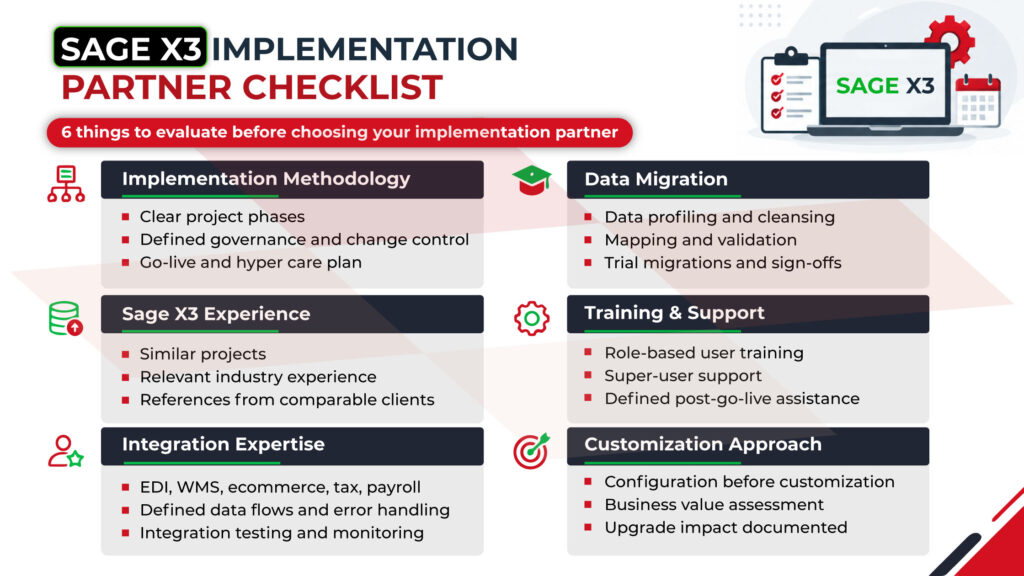
When evaluating Sage X3 implementation partners, consider six areas: Sage X3 experience, implementation methodology, data migration, integration expertise, customization approach, and post-go-live support.
The real measure of the implementation is whether Sage X3 achieves initial business goals. Businesses should monitor user adoption, process efficiency, and realized value over time.
A practical way to view this is across the first 12 months after go-live:
| Period after go-live | What to measure |
| Months 1–3 | User adoption, system usage, and operational stabilization |
| Months 4–6 | Process efficiency, productivity, and reduction in manual work |
| Months 7–9 | New capabilities and improvements enabled by Sage X3 |
| Months 10–12 | ROI, business value, and progress against initial objectives |
This allows the organization to move beyond just asking if Sage X3 is live and assess whether the implementation achieves the initial outcomes.
Sage X3 Implementation Services by Greytrix
Greytrix is a Sage Global Implementation Partner with deep experience in Sage X3 consulting, implementation, integration, and ongoing support. With expertise across industries Greytrix helps businesses align Sage X3 with their operational and industry-specific requirements.
Greytrix supports the Sage X3 implementation lifecycle from design and configuration to testing, training, go-live, and support.
Key capabilities include:
End-to-end implementation: Support from planning and configuration through deployment and stabilization.
Industry expertise: Experience supporting Sage X3 requirements across manufacturing, distribution, food and beverage, chemicals, healthcare, and other industries.
Functional expertise: Consultants across finance, supply chain, manufacturing, and sales.
Integration capabilities: GUMU™ provides native integration capabilities for connecting Sage X3 with CRM, e-commerce, and other business applications, helping businesses improve data flow and reduce manual processes.
Industry-specific solutions: Solutions such as Catch Weight and GUMU™ ShipEazy extend Sage X3 for specific operational requirements across manufacturing,distribution,retail indsutries.
Post-go-live support: Ongoing application support to address issues and support the Sage X3 environment.
Greytrix leverages Sage X3 expertise, industry knowledge, integration, and support to help businesses standardize processes, enhance data visibility, reduce manual work, strengthen control, and scale with growing transaction volumes, sites, and needs.
Conclusion
Sage X3 implementation is a business transformation project that requires careful planning, not just system configuration. Clear objectives, well-defined processes, reliable data, controlled integrations, effective testing, and user adoption all influence the outcome.
A structured implementation approach helps organizations manage scope, cost, timelines, and business requirements throughout the project. Choosing an experienced Sage X3 implementation partner can also provide the functional and technical expertise needed across these stages.
By following the guidance in this Sage X3 implementation guide and measuring results after go-live, businesses can move beyond system deployment and assess whether Sage X3 is improving processes, supporting growth, and delivering the business outcomes defined at the start of the project.
FAQs
1. What are the typical phases of deploying a modern enterprise resource planning system?
A modern ERP implementation involves six phases: Discovery & Planning, Business Process & Requirements Analysis, Solution Design, Configuration & Development, Testing & User Acceptance, and Deployment & Go-Live. These phases include defining objectives and scope, reviewing current processes, designing the solution, configuring the ERP, preparing data, testing, training, and going live with hypercare.
For Sage X3, Greytrix supports these stages through functional consultants across finance, supply chain, manufacturing, and sales, along with technical, data migration, project management, and training expertise.
2. How much does it generally cost to roll out a comprehensive business management software?
ERP implementation costs depend on the number of users, sites, data migration, integrations, customization, process complexity, training, and project readiness. Services usually cost 1.5–3× the first-year license, with multi-country projects needing more.
Additional costs may include data migration, integrations, custom reports, WMS and tax requirements, hosting, and staff time. A detailed scope and requirements assessment is therefore essential for a realistic implementation budget. Greytrix helps businesses assess these requirements, define scope, identify integration needs, and plan implementation costs before configuration begins.
3. How to customize an ERP software during implementation?
To customize an ERP software during implementation, start with business requirements and identify gaps in standard Sage X3 functionality. Use configuration wherever possible, and introduce custom objects, reports, scripts, or integrations only when there is a clear business need. Greytrix combines functional and technical expertise to configure Sage X3 and develop required customizations while considering maintenance and future upgrades.
About Us
Greytrix – a globally recognized and one of the oldest Sage Development Partners is a one-stop solution provider for Sage ERP and Sage CRM organizational needs. Being acknowledged and rewarded for multi-man years of experience and expertise, we bring complete end-to-end assistance for your technical consultations, product customizations, data migration, system integrations, third-party add-on development, and implementation competence.
Greytrix has some unique integration solutions developed for Sage CRM with Sage ERPs namely Sage X3, Sage Intacct, Sage 100, Sage 500, and Sage 300. We also offer best-in-class Sage ERP and Sage CRM customization and development services to Business Partners, End Users, and Sage PSG worldwide. Greytrix helps in the migration of Sage CRM from Salesforce | ACT! | SalesLogix | Goldmine | Sugar CRM | Maximizer. Our Sage CRM Product Suite includes addons like Greytrix Business Manager, Sage CRM Project Manager, Sage CRM Resource Planner, Sage CRM Contract Manager, Sage CRM Event Manager, Sage CRM Budget Planner, Gmail Integration, Sage CRM Mobile Service Signature, Sage CRM CTI Framework.
Greytrix is a recognized Sage Champion Partner for GUMU™ Sage X3 – Sage CRM integration listed on Sage Marketplace and Sage CRM – Sage Intacct integration listed on Sage Intacct Marketplace. The GUMU™ Cloud framework by Greytrix forms the backbone of cloud integrations that are managed in real-time for the processing and execution of application programs at the click of a button.
For more information on our integration solutions, please contact us at sage@greytrix.com. We will be glad to assist you.