
Bank reconciliation is a critical process for ensuring that your organization’s financial records align with the actual transactions in your bank account. In Sage X3, reconciling entries by date and amount can be streamlined with a few systematic steps. This post will guide you through the process of reconciling bank entries using these criteria, including how to create a journal entry (JE) and utilize the Proposal feature in the Bank Reconciliation function.
Step-by-Step: Reconciling Bank Entries by Amount and Date
Step 1:
Before you begin reconciling, ensure that all bank transactions are entered into the system correctly.
- You can verify this using the given path as
Navigate to A/P-A/R Accounting > Bank transactions > Bank statement Entry.
Step 2: Open the Bank Reconciliation Function
- Go to A/P-A/R Accounting > Bank transactions > Bank statement Reconciliation.
- Select the relevant bank account and reconciliation date.
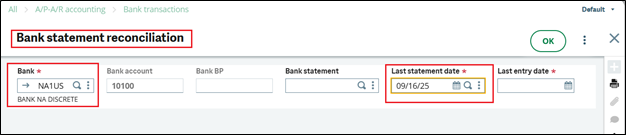
Step 3: Use the “Proposal” button for Automatic Matching
Sage X3 provides a Proposal button that allows automatic reconciliation of entries based on specific criteria like date and amount.
- Click on the Proposal button.

Step 4: Enable “Reconcile by Amount” Option
- In the Proposal window:
- Locate and check the box labeled “Reconcile by amount”.
- Click OK to proceed.
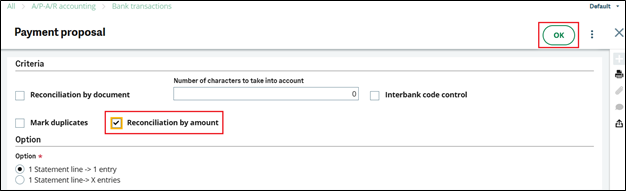
Once selected, Sage X3 will attempt to automatically match and select all bank entries that align by amount.
Step 5: Review and Confirm the Reconciliation
- After clicking OK, Sage X3 will highlight the matched entries in the bank reconciliation screen.
- Check the checkboxes on lines as per amount and Click on Reconciliation button.
- If all the data looks good, click on save.
- Carefully review the selected transactions to ensure accuracy.
- If all matched correctly, validate the reconciliation to complete the process.
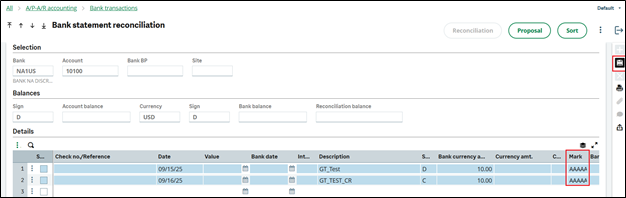
Bank reconciliation in Sage X3 doesn’t have to be a manual, time-consuming task. By leveraging the Proposal tool and enabling Reconcile by amount, you can simplify the process and ensure your records stay accurate. Whether you’re closing the month or preparing for audit, following these steps can save both time and trouble.