
In today’s fast-paced business environment, timely communication between sales teams and customers plays a crucial role in ensuring smooth order processing and excellent customer service. To improve communication and eliminate manual follow-up activities, we have implemented an Email Sending Functionality for Salespersons in Sage 300 ERP. This enhancement automatically notifies the assigned salesperson whenever a sales order is created in the Order Entry module, helping sales teams stay informed about customer transactions in real time.
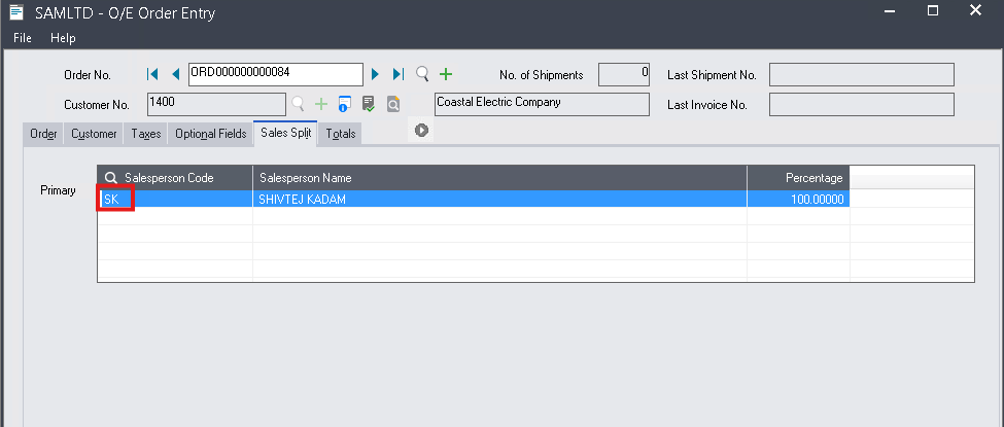
The functionality is designed to work seamlessly within the existing Sage 300 ERP Order Entry process. When a user creates a new sales order, they first select the Customer Number from the Accounts Receivable (AR) Customer master and then assign a Salesperson Code in the Sales Split section of the order. Once the order is saved or processed, the system automatically identifies the salesperson associated with the transaction and sends an email notification to the respective salesperson without requiring any manual intervention.
New Stuff: Export Inventory Status Report to Excel in Sage 300 ERP
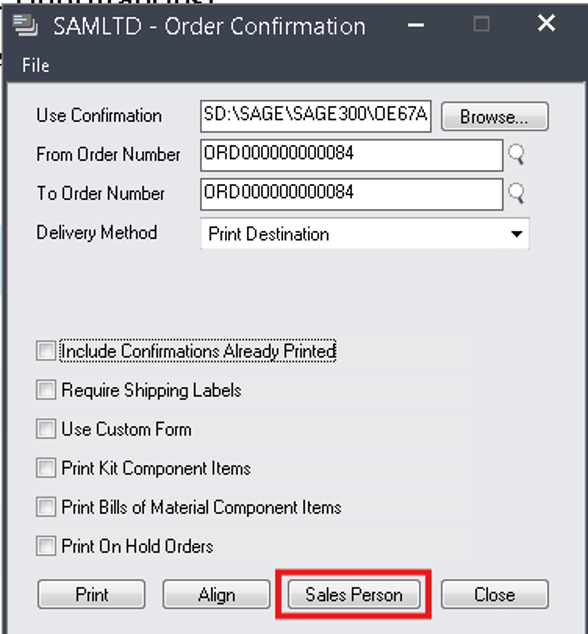
Please refer below screenshot of the user interfaces for the “Order Confirmation Screen”.
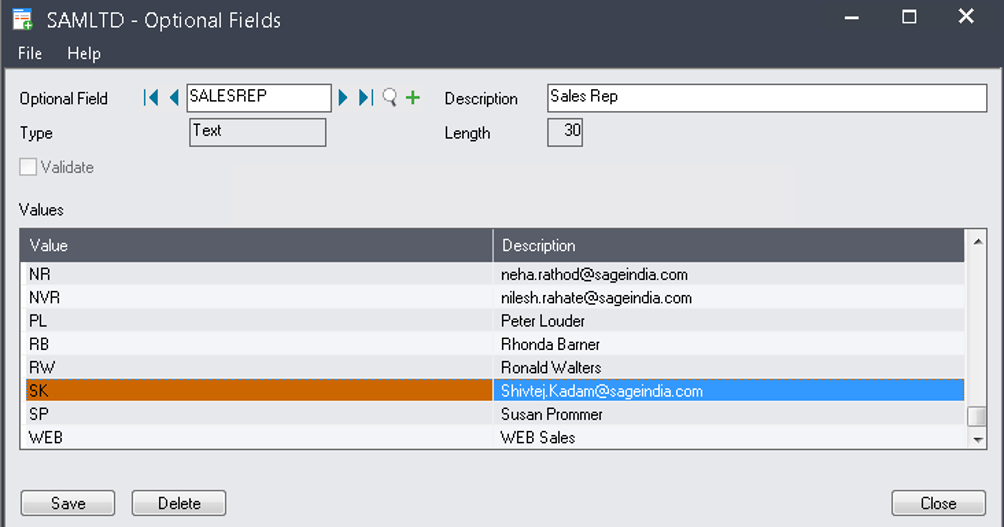
To make this functionality work effectively, a configuration has been introduced in the Common Services module of Sage 300 ERP. An Optional Field has been added to the SALESREP setup, where the email address of each salesperson is maintained against their respective Salesperson Code.
This creates a direct relationship between the salesperson code used during order entry and the email address that should receive notifications. Whenever a salesperson is selected in a transaction, the system automatically retrieves the corresponding email address from this setup and prepares the notification accordingly.
In addition to the salesperson configuration, customer email information is maintained in the Accounts Receivable Customer master. The customer email address serves as an important reference within the process and can be included in the communication workflow depending on business requirements. By maintaining accurate customer contact details within Sage 300 ERP, organizations can ensure consistency and reliability in their communication processes.
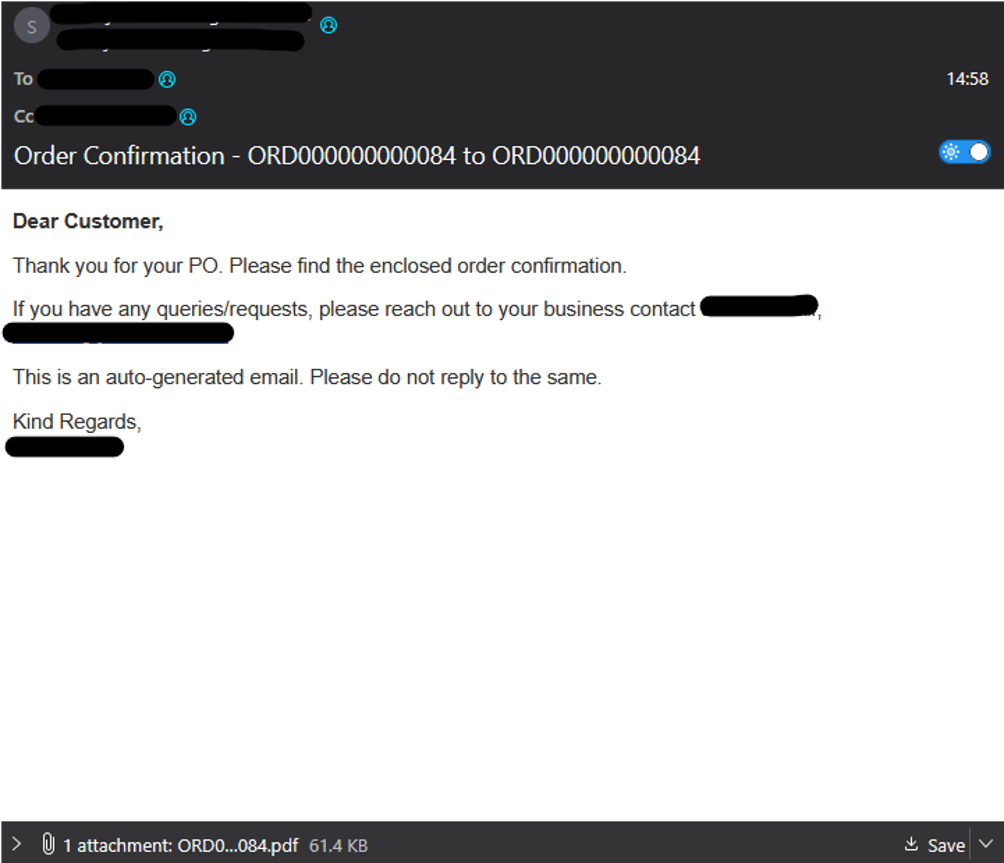
Output:
Step-by-Step Process of Email Sending Functionality for Salespersons in Sage 300 ERP
- The User first configures the salesperson email addresses in Sage 300 ERP by maintaining the email ID against each Salesperson Code in the SALESREP Optional Field under Common Services.
- The customer email address is maintained in the Accounts Receivable (AR) Customer master for the respective customer records.
- A user opens the Order Entry screen in Sage 300 ERP and starts creating a new Sales Order.
- The user selects or enters the Customer Number for whom the order is being created.
- The user enters the required order details such as item information, quantities, pricing, and other transaction-related information.
- In the Sales Split section of the Order Entry screen, the user assigns the appropriate Salesperson Code responsible for the order.
- When the order is saved or processed, the system reads the selected Salesperson Code from the Sales Split information.
- Based on the Salesperson Code, the system automatically retrieves the corresponding salesperson email address from the SALESREP Optional Field setup.
- The system simultaneously retrieves the customer information and customer email address from the AR Customer master.
- The application validates the available email information and prepares the email notification.
- The email is automatically generated with the relevant order details, including customer information and transaction details as configured in the customization.
- The email is then sent directly to the assigned salesperson’s email address without any manual intervention from the user.
- The salesperson receives the email notification immediately and can review the order details.
This automated process eliminates manual email communication, improves response time, and ensures that the responsible salesperson is notified whenever a new sales order is created in Sage 300 ERP.
About Us:-
Greytrix – a globally recognized and one of the oldest Sage Gold Development Partner is a one-stop solution provider for Sage ERP and Sage CRM organizational needs. Being acknowledged and rewarded for multi-man years of experience, we bring complete end-to-end assistance for your technical consultations, product customizations, data migration, system integrations, third party add-on development and implementation competence.
Greytrix offers unique GUMU™ integrated solutions of Sage 300 with Sage CRM, Salesforce.com, Dynamics 365 CRM and MagentoeCommerce along with Sage 300 Migration from Sage 50 US, Sage 50 CA, Sage PRO, QuickBooks, Sage Business Vision and Sage Business Works. We also offer best-in-class Sage 300 customization and development services and integration services for applications such as POS | WMS | Payroll | Shipping System | Business Intelligence | eCommerce for Sage 300 ERP and for Sage 300c development services we offer, upgrades of older codes and screens to new web screens, latest integrations using Data and web services to Sage business partners, end users and Sage PSG worldwide.Greytrix offers 20+ addons for Sage 300 to enhance productivity such as GreyMatrix, Document Attachment, Document Numbering, Auto-Bank Reconciliation, Purchase Approval System, Three way PO matching, Bill of Lading and VAT for Middle East. The GUMU™ integration for Dynamics 365 CRM – Sage ERP is listed on Microsoft Appsource with easy implementation package. For more details on Sage 300 and Sage 300c Services, please contact us at accpac@greytrix.com, We will like to hear from you.