
Managing stock during high demand can be stressful. Sales teams want to confirm orders quickly, but inventory may be limited. In such situations, important customers can miss out if stock is not properly controlled.
In Sage X3, the Sales module includes functionality that allows you to reserve (allocate) stock for specific customers at specific sites. This ensures that certain quantities are protected and cannot be consumed by other sales orders unless it is released.
Step-by-Step Process for Customer Allocation:
Step 1: Navigation → Sales → Allocation → Customer Allocations
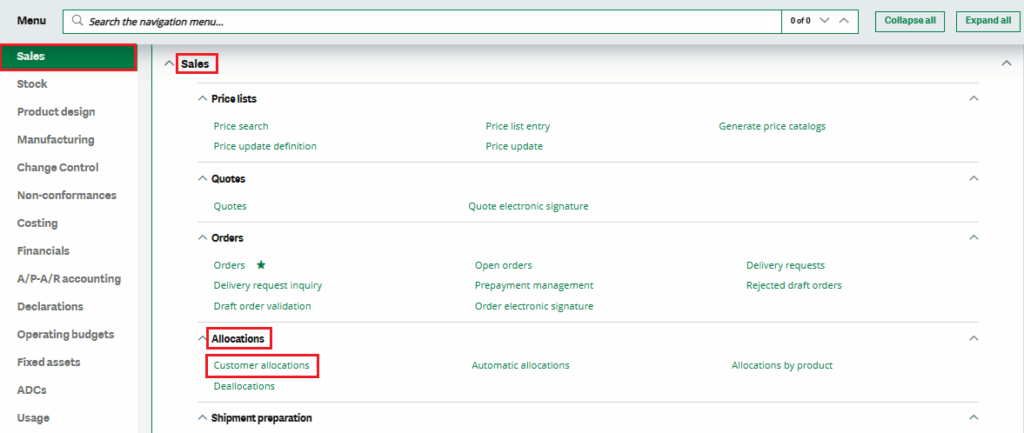
Step 2:
Choose the company and the customer for whom you want to reserve stock. Then, enter the product, set the allocation end date, specify the quantity, and click Save.

Once saved, the system reserves that quantity for the selected customer at the selected site. Other customers cannot consume this reserved stock.
Step 3: Create a Sales Order
Create a sales order for the same customer and ship-to site. Select the product for which you previously made the reservation. After entering the quantity, the system will display a popup message.
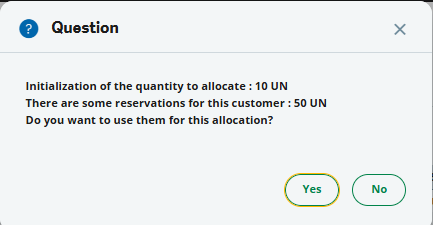
If you select Yes, the system uses the reserved stock.
Step 4: Verify the Allocation
After saving the sales order:
- Go back to Customer Allocations
- Enter the same Company and Customer
- Check the reserved quantity
You will see that the order quantity has been deducted from the reserved quantity. Everything updates automatically. No manual adjustment is required.

This functionality can be further enhanced by enabling customer grouping. Stock reservations can be assigned to a customer group, so that reserving stock for one customer automatically allocates the reserved quantity to all customers within that group.
Customer Allocation in Sage X3 is simple but very effective. It gives you better control over your inventory and helps you honor commitments to key customers.
If your business deals with stock shortages or customer agreements, this feature is worth using. Sometimes, small setup changes can make a big difference in daily operations.