
In Sage X3, every company/site/supplier/customer have their addresses that we fetch from the respective screens to Standard or Custom reports. Normally we create a formula in Crystal Report for address with the required fields and place that formula wherever required. This can be also achieved by using HTML tags in formula. Using this method can be more beneficial because previously we used method in which we used to apply same formatting to all the fields and if you wanted to add different formatting style to each field then that was not possible in a formula but with the help of HTML tags this can be possible, here you can apply different formatting style to any line as per your need.
For Example: We have to print a supplier’s address in Purchase Order report where header section that contains name, address lines, city, country, GST No, contact no, etc. Where Supplier’s name and the headings of other details should be bold.
To achieve this, follow the below steps:
Step 1:
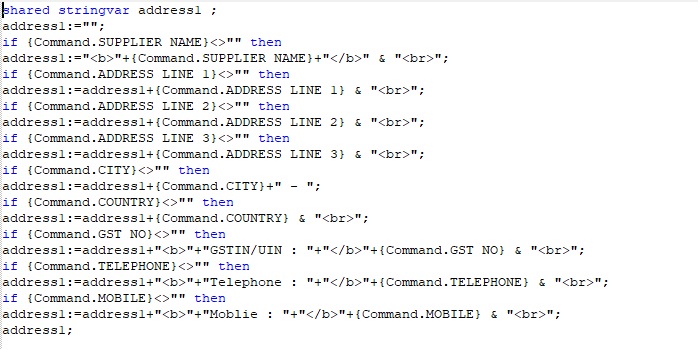
Create a formula in Crystal report, name it as “Supplier Address” and add code in formula wizard as per below screenshot:
New Stuff: Invoice Sequence issue on Finder for Custom screen
Step 2:
Place that formula in your report wherever you want to add.
Step 3:
Right click on that formula and click on format field.
Step 4:
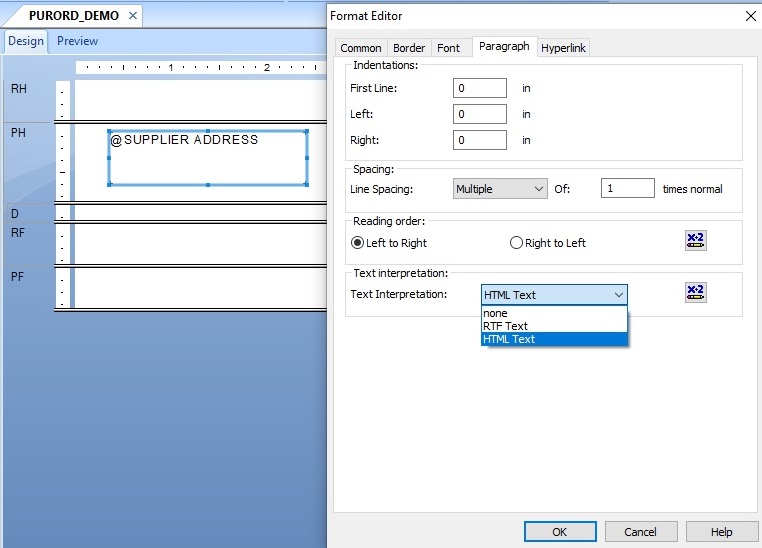
Go to Paragraph tab and select HTML Text from Text Interpretation list as per below screenshot:
Output:

In this way using HTML tags we can do formatting of text in crystal report.
About Us
Greytrix – a globally recognized and one of the oldest Sage Development Partners is a one-stop solution provider for Sage ERP and Sage CRM organizational needs. Being acknowledged and rewarded for multi-man years of experience and expertise, we bring complete end-to-end assistance for your technical consultations, product customizations, data migration, system integrations, third-party add-on development, and implementation competence.
Greytrix has some unique integration solutions developed for Sage CRM with Sage ERPs namely Sage X3, Sage Intacct, Sage 100, Sage 500, and Sage 300. We also offer best-in-class Sage ERP and Sage CRM customization and development services to Business Partners, End Users, and Sage PSG worldwide. Greytrix helps in the migration of Sage CRM from Salesforce | ACT! | SalesLogix | Goldmine | Sugar CRM | Maximizer. Our Sage CRM Product Suite includes addons like Greytrix Business Manager, Sage CRM Project Manager, Sage CRM Resource Planner, Sage CRM Contract Manager, Sage CRM Event Manager, Sage CRM Budget Planner, Gmail Integration, Sage CRM Mobile Service Signature, Sage CRM CTI Framework.
Greytrix is a recognized Sage Champion Partner for GUMU™ Sage X3 – Sage CRM integration listed on Sage Marketplace and Sage CRM – Sage Intacct integration listed on Sage Intacct Marketplace. The GUMU™ Cloud framework by Greytrix forms the backbone of cloud integrations that are managed in real-time for the processing and execution of application programs at the click of a button.
For more information on our integration solutions, please contact us at sage@greytrix.com. We will be glad to assist you.