
In Sage X3, valuation methods are used to determine how inventory values are calculated. These methods affect financial reporting and decision-making processes. The primary valuation methods in Sage X3 include:
- Standard Cost (STD): Assigns a fixed cost to inventory items, constant over time. Variances between the standard cost and actual costs are recorded separately.
- Weighted Average Cost (WAC): Calculates the average cost of all similar items in inventory. The average cost is recalculated each time new stock is added.
- First In, First Out (FIFO): Assumes the oldest inventory items are used or sold first, based on the cost of the earliest purchased items.
- Last In, First Out (LIFO): Assumes the most recently acquired inventory items are used or sold first, matching recent costs with current revenues. This may not be permissible under certain accounting standards.
- Actual Cost (ACT): Tracks the exact cost of each individual inventory item, providing high accuracy but is complex and data-intensive to maintain.
These methods help businesses manage inventory costs, financial planning, and reporting according to their specific needs and regulatory requirements.
NOTE: You define the primary and secondary valuation methods for a specific valuation code, choosing one or two methods per code. Both methods are updated based on stock transactions or movements. You can also decide if the stock value should be updated by internal stock movements and if average costs should be recalculated.
Project Budget Lines:
Project budget lines can be created using the detailed cost breakdown of manufactured products requested for project material tasks. You define the default product valuation method for generating project budget lines through the “Generate budget lines” action in the Project Management function (GESPJM). You can choose one or two valuation methods per code, both updated based on stock transactions or movements.
Valuation Methods:
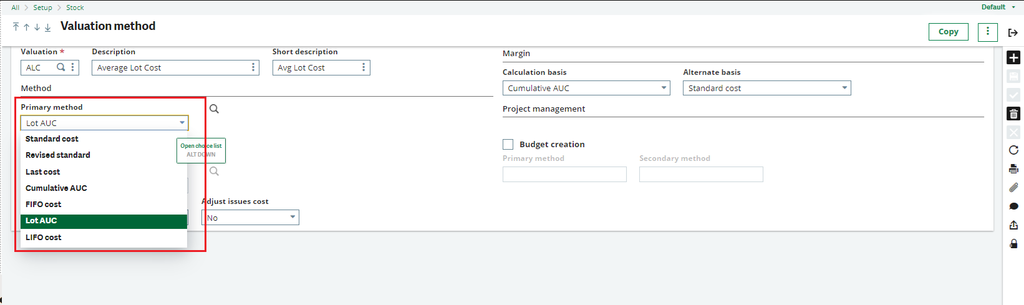
Fig 1 : Valuation methods.
Primary Method (Field ISS1):
Use this field to choose the method for valuing stock. Available methods are:
- Standard Cost: Fixed unit cost per site, constant for the fiscal year.
- Revised Cost: Revised standard cost based on actual costs, applicable to a specific date range.
- Last Cost: Based on the actual cost of the most recent stock transaction.
- Cumulative AUC (Average Unit Cost): Average value of stock received and total stock on hand.
- FIFO Cost (First In, First Out): Cost of the oldest stock first.
- Lot AUC (Average Unit Cost): Average value of each lot and sublot received.
- LIFO Cost (Last In, First Out): Cost of the most recent stock first.
Secondary Method (Field ISS2):
Use this field to define the additional stock valuation method for this valuation method code.Budget Creation:
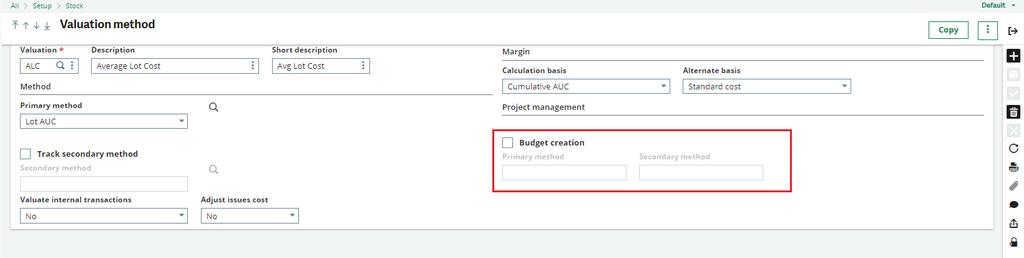
Fig 2 : Budget creation
Budget Creation (Field PJMBUDMAN):
Select this checkbox if this valuation method can be used by the “Generate budget lines” action in the Project Management function (GESPJM). If not, leave it unchecked.
Primary Method (Field PJMBUDVLTC):
Use this field to set the primary budgeting method for generating project budget lines via the “Generate budget lines” action in the Project Management function (GESPJM).
Available methods are:
- Standard Cost: Fixed unit cost per site, applicable to the fiscal year.
- Revised Standard Cost: Based on revised standard cost from actual costs, for a specific date range.
- Budget Cost: Based on a predefined cost, applicable to the fiscal year.
- Simulated Cost: Based on estimated or trial costs.
- Not Applicable: No budget method is required for this valuation method.
Secondary Method (Field PJMBUDVLT2):
Use this field to set an additional budgeting method for generating project budget lines via the “Generate budget lines” action in the Project Management function (GESPJM). This secondary method will be used if the primary budgeting method returns no values.