
In Sage X3, this function is used to transfer all the stock movements to the general ledger.
The entry screen contains below fields:
- Prior Processing: This field displays the last date the process was run.
- Processing Date: This date must fall between the date of the last process and the current date to avoid an incomplete transfer of the current day’s movements. All stock movements created or modified after the last transfer and for which the Selected criterion date (Creation or Accounting) does not exceed this date are included.
Enter the date for the transfer.
- Selection Criterion: Select Creation date or Accounting date to determine how stock movements are filtered. All the stock movements where this date does not exceed the Processing date are included.
- Financial site: Enter a financial site to run the process on stock movements for that site only. This field is not required. If left blank, all the stock movements for all financial sites for the selected date are included.
If a parameter is not set for processing accounting interface, you will receive a below warning message.
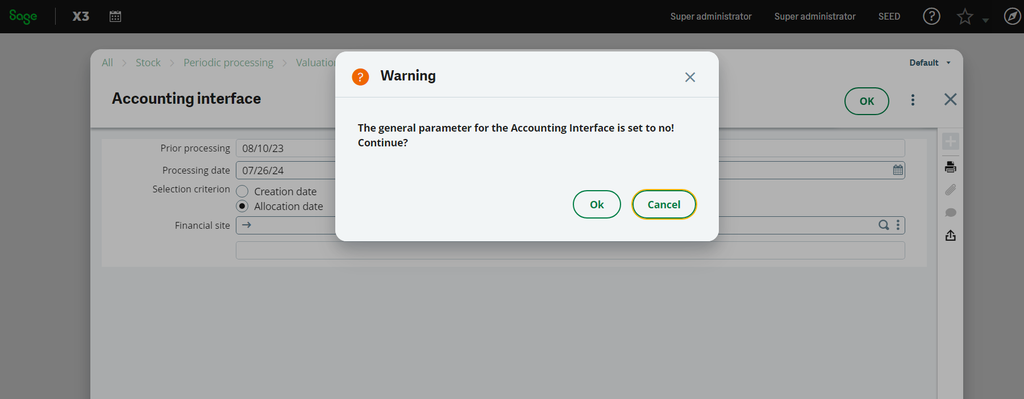
Fig01: Accounting Interface screen.
To solve this follow below process.
- Navigate to: Setup -> General Parameters -> Parameter Values
- Click on STO Inventory.
- Click on Groups -> Accounting interface
- Check ACCIFA parameter, if it is set as ‘No’. Please set it to ‘Yes’.
- Save it.
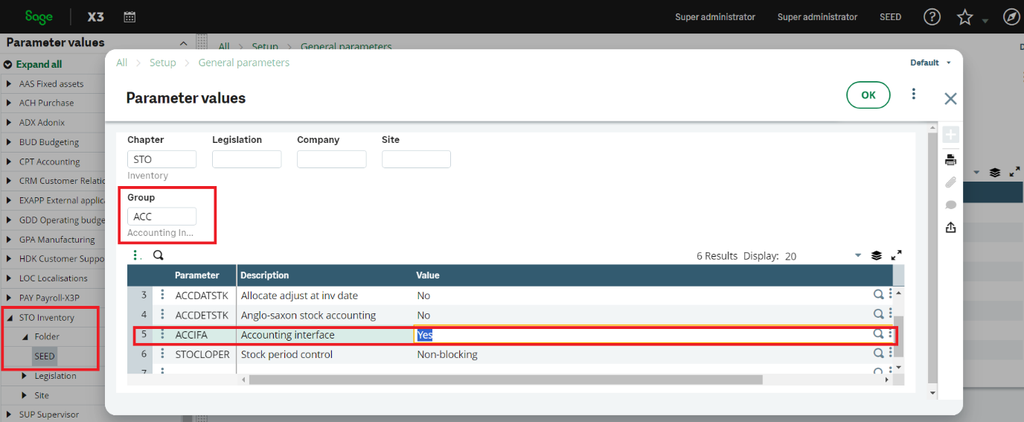
Fig02: Parameter values
After setting above parameters. Now run the accounting interface to see if any error occurs now.
Conclusion: With this setup user can process the accounting interface without any error.